Showing posts with label Oracle SOA 12C. Show all posts

Wednesday, October 7, 2020

Resource manager is unavailable. ORA-17002 SQLErr (0) Weblogic

Data source issue in Oracle Weblogic/SOA

Error:


Internal Exception: java.sql.SQLException: Unexpected exception while enlisting XAConnection java.sql.SQLException: XA error: XAResource.XAER_RMFAIL start() failed on resource 'dsname_doamain': XAER_RMFAIL : Resource manager is unavailable

oracle.jdbc.xa.OracleXAException: XAErr (-7): Resource manager is unavailable. ORA-17002 SQLErr (0)

          at oracle.jdbc.xa.OracleXAResource.checkError(OracleXAResource.java:1113)


Solution:


Go to data source--> Connection Pool and Advanced


Set the following:


Test Connections On Reserve: true

Test Frequency: 60

Connection Creation Retry Frequency: 10


Save, activate the changes and restart the servers.


Check below site for the best hiking gears for your next hiking adventure.

Hiking Insights


Best Camping Tables

Monday, June 8, 2015

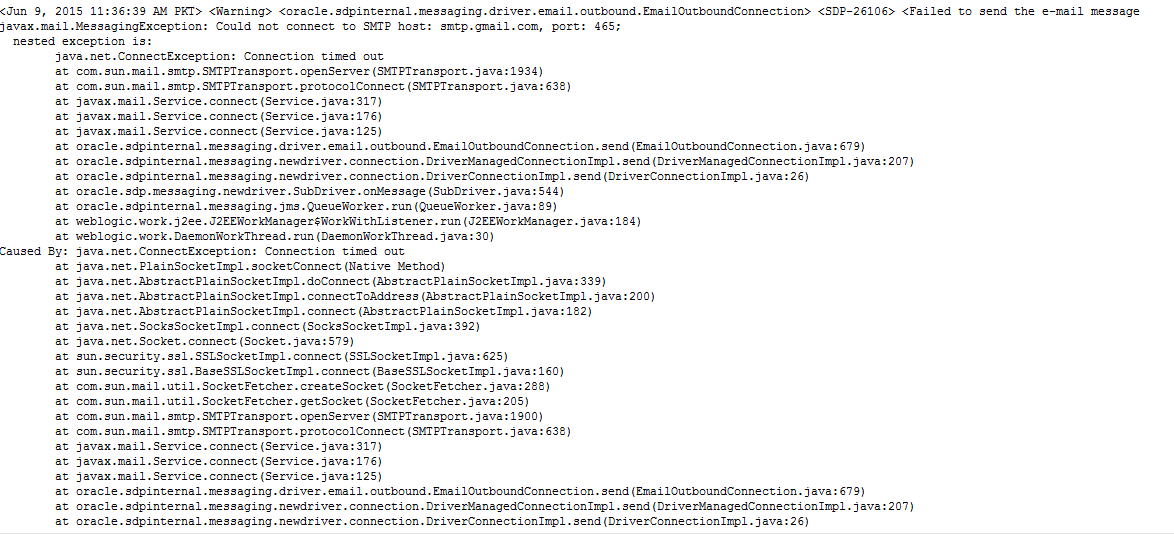
Oracle SOA BPEL Email error Could not connect to SMTP host: smtp.gmail.com

I configured email server in Enterprise Manger and then I used email activity in BPEL to send notifications. But I was facing the below issue. After much troubleshooting I figured it out as network issue. My server was behind proxy server and it was blocking such type traffic then I have to check it with network guy who unblocked this port and then my emails started working properly.

<Warning> <oracle.sdpinternal.messaging.driver.email.outbound.EmailOutboundConnection> <SDP-26106> <Failed to send the e-mail message
javax.mail.MessagingException: Could not connect to SMTP host: smtp.gmail.com, port: 465;
  nested exception is:
        java.net.ConnectException: Connection timed out
        at com.sun.mail.smtp.SMTPTransport.openServer(SMTPTransport.java:1934)

Thursday, April 30, 2015

Linux command to set ORACLE_HOME temporary

When someone is newbie, these types of command are really helpful. I just want to share how to set  ORACLE_HOME path easily. Following is the command.

export ORACLE_HOME=/Oracle/Middleware/Oracle_Home

To check ORACLE_HOME use the following command

echo $ORACLE_HOME
It should be:

/Oracle/Middleware/Oracle_Home

Wednesday, April 29, 2015

OPatch command error, Oracle SOA 12c opatch commad

I was executing opatch command to know about version but I had been facing the following error. I could not understand why is it happening. Then I used the correct path of JDK with below command an it worked.
[oracle@bpm01 OPatch]$ ./opatch lsinventory
Exception in thread "main" java.lang.UnsupportedClassVersionError: com/oracle/cie/gdr/external/InventoryException : Unsupported major.minor version 51.0
        at java.lang.ClassLoader.defineClass1(Native Method)
        at java.lang.ClassLoader.defineClassCond(ClassLoader.java:631)
        at java.lang.ClassLoader.defineClass(ClassLoader.java:615)
        at java.security.SecureClassLoader.defineClass(SecureClassLoader.java:141)
        at java.net.URLClassLoader.defineClass(URLClassLoader.java:283)
        at java.net.URLClassLoader.access$000(URLClassLoader.java:58)
        at java.net.URLClassLoader$1.run(URLClassLoader.java:197)
        at java.security.AccessController.doPrivileged(Native Method)
        at java.net.URLClassLoader.findClass(URLClassLoader.java:190)
        at java.lang.ClassLoader.loadClass(ClassLoader.java:306)
        at sun.misc.Launcher$AppClassLoader.loadClass(Launcher.java:301)
        at java.lang.ClassLoader.loadClass(ClassLoader.java:247)
        at oracle.opatch.OPatch.main(OPatch.java:548)

OPatch failed with error code 1
[oracle@bpm01 OPatch]$

Here is the command with JDK path in linux

[oracle@bpm01 OPatch]$ ./opatch lsinventory -jdk /usr/java/jdk1.7.0_75

OPatch Version : 13.2.0.0.0
  OUI  Version : 12.1.0.1.0
The OPatch version is not applicable for current OUI version.

Since OUI Version starts with 12.1, Please go to 'My Oracle Support' and get right OPatch 12.1.*.*.* based on patch 6880880, release version 12.1.0.0.0 and appropriate platform.
 I hope it could be helpful if someone faces this issue.

Tuesday, April 28, 2015

Oracle SOA Suite 12C search Instances by Flow ID

Well, its very simple post but you can face problem when use Oracle SOA suite 12c to search specific instance by using Flow ID  . If you have worked with Oracle SOA suite 11g, You would have observed search criteria which is very simple but in 12C, search criteria is little advance. I want to search instance by using Flow ID but in first glance I could not.

To do this click on Add/Remove filters in search window and then check flow instance. Default this option is unchecked but I think it should be checked. Following is the screenshot for detailed description.