Showing posts with label Problems. Show all posts

Wednesday, October 7, 2020

Resource manager is unavailable. ORA-17002 SQLErr (0) Weblogic

Data source issue in Oracle Weblogic/SOA

Error:


Internal Exception: java.sql.SQLException: Unexpected exception while enlisting XAConnection java.sql.SQLException: XA error: XAResource.XAER_RMFAIL start() failed on resource 'dsname_doamain': XAER_RMFAIL : Resource manager is unavailable

oracle.jdbc.xa.OracleXAException: XAErr (-7): Resource manager is unavailable. ORA-17002 SQLErr (0)

          at oracle.jdbc.xa.OracleXAResource.checkError(OracleXAResource.java:1113)


Solution:


Go to data source--> Connection Pool and Advanced


Set the following:


Test Connections On Reserve: true

Test Frequency: 60

Connection Creation Retry Frequency: 10


Save, activate the changes and restart the servers.


Check below site for the best hiking gears for your next hiking adventure.


Hiking Insights


Best Camping Tables

Monday, July 30, 2018

Failed to import appliance Error reading OVA VERR_TAR_UNEXPECTED_EOS

Issue:
While importing OVA file in Oracle virtual box, below issue can come.
Failed to import appliance OST01.ova.  Error reading OVA 'OST01.ova' (VERR_TAR_UNEXPECTED_EOS).
 Result Code: VBOX_E_IPRT_ERROR (0x80BB0005) Component: ApplianceWrap Interface: IAppliance {8398f026-4add-4474-5bc3-2f9f2140b23e}

Failed to import appliance Error reading OVA  VERR_TAR_UNEXPECTED_EOS


Workaround:

Download the 7zip and extract your OVA file by using it. Now import your .ovf file which you got after extraction, this should work.

Process Verification Failure: The process has more than one thread.VirtualBox


Issue:

VirtualBox - Error In supR3HardenedWinReSpawn

rc= -55640)
Please try reinstalling VirtualBox

where: supR3HardenedWinReSpawn what: 1
VER_SUR_VP_THREAD_NOT_ALONE (-5640) - Process Verification Failure:
The process has more than one thread.


Workaround:
Download and install the VirtualBox 5.1.16 (released March 08 2017) and you will not get this issue.

Wednesday, July 11, 2018

C:\Program' is not recognized as an internal or external command

Issue:

D:\Software\Jdev\fmw_12.2.1.3.0_soaqs_Disk1_1of2>C:\Program Files\Java\jdk1.8.0_171\bin\java.exe -jar fmw_12.2.1.3.0_soa_quickstart.jar
'C:\Program' is not recognized as an internal or external command,
operable program or batch file.

Reason:

Space in directory Program Files.

Workaround: Use " " like below: 

D:\Software\Jdev\fmw_12.2.1.3.0_soaqs_Disk1_1of2>"C:\Program Files\Java\jdk1.8.0_171\bin\java.exe" -jar fmw_12.2.1.3.0_soa_quickstart.jar
Launcher log file is D:\Users\muhammad.nasir\AppData\Local\Temp\OraInstall2018-07-05_12-00-01PM\launcher2018-07-05_12-00-01PM.log.
Extracting the installer . . . . . . . . . . .

xhost unable to open display,Please set the DISPLAY

Workaround:

1) log into console as root and open a terminal. 
2) DISPLAY=:0.0
3) export DISPLAY
4) xhost +
5) su - oracle
6) DISPLAY=:0.0
7) export DISPLAY


Detail Error:

SPLAY is not set.  Please set the DISPLAY environment variable and try again.
Depending on the Unix Shell, you can use one of the following commands as examples to set the DISPLAY environment variable:
- For csh:  %% setenv DISPLAY 192.168.1.128:0.0
- For sh, ksh and bash: $ DISPLAY=192.168.1.128:0.0; export DISPLAY
Use the following command to see what shell is being used:
echo $SHELL
Use the following command to view the current DISPLAY environment variable setting:
echo $DISPLAY
- Make sure that client users are authorized to connect to the X Server.
To enable client users to access the X Server, open an xterm, dtterm or xconsole as the user that started the session and type the following command:
%% xhost +
To test that the DISPLAY environment variable is set correctly, run a X11 based program that comes with the native operating system such as 'xclock':
%% <full path to xclock; see below>
If you are not able to run xclock successfully, please refer to your PC-X Server or OS vendor for further assistance.
Typical path for xclock: /usr/X11R6/bin/xclock
java.awt.HeadlessException:
No X11 DISPLAY variable was set, but this program performed an operation which requires it.
at java.awt.GraphicsEnvironment.checkHeadless(GraphicsEnvironment.java:204)
at java.awt.Window.<init>(Window.java:536)
at java.awt.Frame.<init>(Frame.java:420)
at java.awt.Frame.<init>(Frame.java:385)
at javax.swing.SwingUtilities$SharedOwnerFrame.<init>(SwingUtilities.java:1758)
at javax.swing.SwingUtilities.getSharedOwnerFrame(SwingUtilities.java:1833)
at javax.swing.JDialog.<init>(JDialog.java:272)
at javax.swing.JDialog.<init>(JDialog.java:206)
at javax.swing.JDialog.<init>(JDialog.java:154)
at oracle.as.install.engine.modules.presentation.ui.common.dialogs.SpecifyInventoryDirectoryDialog.<init>(SpecifyInventoryDirectoryDialog.java:248)
at oracle.as.install.engine.modules.presentation.ui.common.dialogs.SpecifyInventoryDirectoryDialog.showDialog(SpecifyInventoryDirectoryDialog.java:781)
at oracle.sysman.oio.oioc.OiocOneClickInstaller.main(OiocOneClickInstaller.java:643)

The log(s) can be found here: /tmp/OraInstall2018-07-12_12-27-39AM.

Thursday, May 11, 2017

ERROR: 1045 (28000): Access denied for user 'abc'@'localhost' (using password: YES)


This issue comes when you are not entering your MYSQL connection string properly. Below screenshot shows how to connect to MYSQL and avoid this issue.

[SQLServer]Could not find stored procedure 'master..xp_jdbc_open2'.


Problem:

<Console encountered the following error java.sql.SQLException: [FMWGEN][SQLServer JDBC Driver][SQLServer]Could not find stored procedure 'master..xp_jdbc_open2'.


Workaround:

Go to your Data Source configuration on Weblogic Console and change the Driver Class Name to following:

weblogic.jdbc.sqlserver.SQLServerDriver

These are the drivers for NonXA data source. 

However if you want to create an XA connection with MS SQL server then some configuration are required at MS SQL side. 

Go to /fmwinfra/oracle_common/modules/datadirect of your weblogic installation directory. Copy these two files instjdbc.sql and x64sqljdbc.dll if you are using 64 bit SQL server otherwise select as per version from the same directory to MS  SQL Installation bin directory. 

Execute instjdbc.sql  in MS SQL server. Now create XA data source in your weblogic server. It should work. If there are multiple SQL servers then you will have to do the same configuration on all SQL servers. Hope this will help. 

Conversion of type '' whose JDBC type is OTHER to a Java object is not supported.


While calling a Store procedure from MS SQL server, following issue can come

Problem:
Conversion of type 365366 whose JDBC type is OTHER to a Java object is not supported.
An attempt was made to convert type 365366 to a Java object using an unsupported JDBC type: OTHER.
; nested exception is: 
BINDING.JCA-11800
Unimplemented object conversion.
Conversion of type 365366 whose JDBC type is OTHER to a Java object is not supported.
An attempt was made to convert type 365366 to a Java object using an unsupported JDBC type: OTHER.
Use a data type with a supported JDBC type.


Solution:

Go to your Database adapter connection factory and change PlateformClassName from
org.eclipse.persistence.platform.database.Oracle10Platform

To
oracle.toplink.platform.database.SQLServerPlatform


Sunday, December 18, 2016

Resolved:Connection refused: connect. CFGFWK-60850: Test Failed!

While extending SOA domain for OSB, we can come across the following issue


Component Schema=OSB JMS Reporting Provider Driver=org.apache.derby.jdbc.ClientDriver
URL=jdbc:derby://localhost:1527/osbexamples;ServerName=localhost;databaseName=osbexamples
User=DEV_SOAINFRA Password=******** SQL Test=SELECT 1 FROM SYS.SYSTABLES  java.net.ConnectException :
 Error connecting to server localhost on port 1527 with message Connection refused: connect. CFGFWK-60850:  Test Failed!

OR

SQL Test=SELECT 1 FROM SYS.SYSTABLES  Insufficient data while reading from the network - expected a minimum of 6 bytes and received only 0 bytes.  The connection has been terminated. CFGFWK-60850:  Test Failed!

Solution:

This issue occurs due to wrong password, vendor or service name. To resolve this issue just make sure database connection string is fine as shown below:


Monday, October 17, 2016

Error occurred during initialization of VM

After fresh installation of Oracle SOA, I started getting the below error while starting servers.

Error occurred during initialization of VM
Could not reserve enough space for object heap
Could not create the Java virtual machine.

After trying different solution from the Web I changed the JDK version and it started working fine. I was using C:\Oracle\Middleware\jdk160_24 JDK previously which did not work and then I updated it with C:\Program Files\Java\jdk1.8.0_51 in setDomainEnv file and it started working fine. 

Monday, May 23, 2016

Problem while accessing Oracle Application, Security Issue

The most irritating message when you try to run any applet you get. Sometimes even if you installed the below mentioned J2SE plugin, it still does not work.

I got the same issue and I uninstalled all of my Java versions first and then I installed the below mentioned Java plugin and then it started working fine.

In order to access this application, you must install the J2SE Plugin version 1.6.0_07. To install this plugin, click here to download the oaj2se.exe executable. Once the download is complete, double-click the oaj2se.exe file to install the plugin. You will be prompted to restart your browser when the installation is complete.

Tuesday, May 17, 2016

Local area connection is not showing under network and sharing center, LAN is not working issue

Local Area connection is not showing up in network connection and sharing center. To resolve this issue I found very useful video which helped me to resolve my issue immediately. I installed LAN driver again and again but that did not work.

Monday, May 2, 2016

BPM Timer Process java.lang.NoClassDefFoundError: oracle/bpm/runtime/quartz/trigger/TriggerWithReschedule


Following issue came because one of the library could not be loaded. So you need to add that library to lib directory of your SOA domain.

Go to the /oracle/Middleware/Oracle_SOA1/soa/modules and then copy the oracle.bpm.runtime.classloader-util.jar jar file.

Go to /oracle/Middleware/user_projects/domains/[domain_name]/lib directory and past that file.

restart the servers, hope this will help.

javax.ejb.EJBException: EJB Exception: : java.lang.NoClassDefFoundError: oracle/bpm/runtime/quartz/trigger/TriggerWithReschedule
at oracle.bpm.bpmn.engine.model.runtime.util.SchedulingHelper.schedule(SchedulingHelper.java:46)
at oracle.bpm.bpmn.engine.model.TimerStartEventScheduler.schedule(TimerStartEventScheduler.java:172)
at oracle.bpm.bpmn.engine.ejb.impl.BPMNServerManagerBean.scheduleStartTimerEvents(BPMNServerManagerBean.java:261)
at sun.reflect.NativeMethodAccessorImpl.invoke0(Native Method)
at sun.reflect.NativeMethodAccessorImpl.invoke(NativeMethodAccessorImpl.java:39)
at sun.reflect.DelegatingMethodAccessorImpl.invoke(DelegatingMethodAccessorImpl.java:25)
at java.lang.reflect.Method.invoke(Method.java:597)
at com.bea.core.repackaged.springframework.aop.support.AopUtils.invokeJoinpointUsingReflection(AopUtils.java:310)
at com.bea.core.repackaged.springframework.aop.framework.ReflectiveMethodInvocation.invokeJoinpoint(ReflectiveMethodInvocation.java:182)
at com.bea.core.repackaged.springframework.aop.framework.ReflectiveMethodInvocation.proceed(ReflectiveMethodInvocation.java:149)
at com.bea.core.repackaged.springframework.aop.support.DelegatingIntroductionInterceptor.doProceed(DelegatingIntroductionInterceptor.java:131)
at com.bea.core.repackaged.springframework.aop.support.DelegatingIntroductionInterceptor.invoke(DelegatingIntroductionInterceptor.java:119)
at com.bea.core.repackaged.springframework.aop.framework.ReflectiveMethodInvocation.proceed(ReflectiveMethodInvocation.java:171)
at com.bea.core.repackaged.springframework.jee.spi.MethodInvocationVisitorImpl.visit(MethodInvocationVisitorImpl.java:37)
at weblogic.ejb.container.injection.EnvironmentInterceptorCallbackImpl.callback(EnvironmentInterceptorCallbackImpl.java:54)
at com.bea.core.repackaged.springframework.jee.spi.EnvironmentInterceptor.invoke(EnvironmentInterceptor.java:50)
at com.bea.core.repackaged.springframework.aop.framework.ReflectiveMethodInvocation.proceed(ReflectiveMethodInvocation.java:171)
at com.bea.core.repackaged.springframework.aop.interceptor.ExposeInvocationInterceptor.invoke(ExposeInvocationInterceptor.java:89)
at com.bea.core.repackaged.springframework.aop.framework.ReflectiveMethodInvocation.proceed(ReflectiveMethodInvocation.java:171)
at com.bea.core.repackaged.springframework.aop.support.DelegatingIntroductionInterceptor.doProceed(DelegatingIntroductionInterceptor.java:131)
at com.bea.core.repackaged.springframework.aop.support.DelegatingIntroductionInterceptor.invoke(DelegatingIntroductionInterceptor.java:119)
at com.bea.core.repackaged.springframework.aop.framework.ReflectiveMethodInvocation.proceed(ReflectiveMethodInvocation.java:171)
at com.bea.core.repackaged.springframework.aop.framework.JdkDynamicAopProxy.invoke(JdkDynamicAopProxy.java:204)
at $Proxy287.scheduleStartTimerEvents(Unknown Source)
at oracle.bpm.bpmn.engine.ejb.impl.BPMNServerManagerBean_6gbx7k_IBPMNCubeServerManagerLocalBeanImpl.__WL_invoke(Unknown Source)
at weblogic.ejb.container.internal.SessionLocalMethodInvoker.invoke(SessionLocalMethodInvoker.java:39)
at oracle.bpm.bpmn.engine.ejb.impl.BPMNServerManagerBean_6gbx7k_IBPMNCubeServerManagerLocalBeanImpl.scheduleStartTimerEvents(Unknown Source)
at oracle.bpm.bpmn.engine.service.BPMNServiceEngine.scheduleStartTimerEvents(BPMNServiceEngine.java:1398)
at oracle.bpm.bpmn.engine.service.BPMNServiceEngine.postDeployComponent(BPMNServiceEngine.java:1131)
at oracle.bpm.bpmn.engine.service.BPMNServiceEngine.internalPostDeployComponent(BPMNServiceEngine.java:1353)
at oracle.bpm.bpmn.engine.service.BPMNServiceEngine.onApplicationEvent(BPMNServiceEngine.java:1073)
at org.springframework.context.event.SimpleApplicationEventMulticaster$1.run(SimpleApplicationEventMulticaster.java:78)
at org.springframework.core.task.SyncTaskExecutor.execute(SyncTaskExecutor.java:49)
at org.springframework.context.event.SimpleApplicationEventMulticaster.multicastEvent(SimpleApplicationEventMulticaster.java:76)
at org.springframework.context.support.AbstractApplicationContext.publishEvent(AbstractApplicationContext.java:274)
at oracle.integration.platform.blocks.deploy.DeploymentEventPublisher.invoke(DeploymentEventPublisher.java:93)
at org.springframework.aop.framework.ReflectiveMethodInvocation.proceed(ReflectiveMethodInvocation.java:171)
at org.springframework.transaction.interceptor.TransactionInterceptor.invoke(TransactionInterceptor.java:106)
at org.springframework.aop.framework.ReflectiveMethodInvocation.proceed(ReflectiveMethodInvocation.java:171)
at org.springframework.aop.framework.JdkDynamicAopProxy.invoke(JdkDynamicAopProxy.java:204)
at $Proxy374.deploy(Unknown Source)
at oracle.integration.platform.kernel.FabricKernelInitializerServlet$1.run(FabricKernelInitializerServlet.java:819)
at oracle.integration.platform.blocks.executor.WorkManagerExecutor$1.run(WorkManagerExecutor.java:120)
at weblogic.work.j2ee.J2EEWorkManager$WorkWithListener.run(J2EEWorkManager.java:183)
at weblogic.work.DaemonWorkThread.run(DaemonWorkThread.java:30)
Caused by: java.lang.ClassNotFoundException: oracle.bpm.runtime.quartz.trigger.TriggerWithReschedule

Tuesday, December 1, 2015

javax.naming.CommunicationException [Root exception is java.net.ConnectException: t3: Destination unreachable

While compiling some code in JDeveloper I was getting the below error. It was coming due to proxy issue. So go to Jdeveloper then Tools---Preferences---Web Browser and Proxy then in exceptions field enter your server hostname. Test your code again and this time hopefully error will not come. It resolved my issue and i hope it will be helpful.


SEVERE: javax.naming.CommunicationException [Root exception is java.net.ConnectException: t3://hostname:port: Destination unreachable; nested exception is: 
java.net.ProtocolException: unrecognized response from proxy: 'HTTP/1.1 502 Proxy Error ( The specified Secure Sockets Layer (SSL) port is not allowed. Forefront TMG is not configured to allow SSL requests from this port. Most Web browsers use port 443 for SSL requests.  )'; No available router to destination]
oracle.bpel.services.workflow.client.WorkflowServiceClientException: javax.naming.CommunicationException [Root exception is java.net.ConnectException: t3://hostname:port: Destination unreachable; nested exception is: 
java.net.ProtocolException: unrecognized response from proxy: 'HTTP/1.1 502 Proxy Error ( The specified Secure Sockets Layer (SSL) port is not allowed. Forefront TMG is not configured to allow SSL requests from this port. Most Web browsers use port 443 for SSL requests.  )'; No available router to destination]
at oracle.bpel.services.workflow.client.WorkflowServiceClientContext.createInitialContext(WorkflowServiceClientContext.java:793)
at oracle.bpel.services.workflow.client.WorkflowServiceClientContext.getJNDIInitialContext(WorkflowServiceClientContext.java:423)
at oracle.bpel.services.workflow.query.client.TaskQueryServiceRemoteClient.getInitialContext(TaskQueryServiceRemoteClient.java:47)
at oracle.bpel.services.workflow.query.client.TaskQueryServiceRemoteClient.authenticate(TaskQueryServiceRemoteClient.java:90)
at sun.reflect.NativeMethodAccessorImpl.invoke0(Native Method)
at sun.reflect.NativeMethodAccessorImpl.invoke(NativeMethodAccessorImpl.java:39)
at sun.reflect.DelegatingMethodAccessorImpl.invoke(DelegatingMethodAccessorImpl.java:25)
at java.lang.reflect.Method.invoke(Method.java:597)
at oracle.bpel.services.workflow.client.WFClientRetryInvocationHandler.invokeTarget(WFClientRetryInvocationHandler.java:144)
at oracle.bpel.services.workflow.client.WFClientRetryInvocationHandler.invoke(WFClientRetryInvocationHandler.java:82)
at $Proxy14.authenticate(Unknown Source)
at nl.whitehorses.fcforms.tasks.utility.BPELWorkflowServices.authenticate(BPELWorkflowServices.java:191)
at nl.whitehorses.fcforms.tasks.services.HumanTaskClient.completeTask(HumanTaskClient.java:265)
at nl.whitehorses.fcforms.tasks.test.Complete.<init>(Complete.java:9)
at nl.whitehorses.fcforms.tasks.test.Complete.main(Complete.java:14)
Caused by: javax.naming.CommunicationException [Root exception is java.net.ConnectException: t3://hostname:port: Destination unreachable; nested exception is: 
java.net.ProtocolException: unrecognized response from proxy: 'HTTP/1.1 502 Proxy Error ( The specified Secure Sockets Layer (SSL) port is not allowed. Forefront TMG is not configured to allow SSL requests from this port. Most Web browsers use port 443 for SSL requests.  )'; No available router to destination]
at weblogic.jndi.internal.ExceptionTranslator.toNamingException(ExceptionTranslator.java:40)
at weblogic.jndi.WLInitialContextFactoryDelegate.toNamingException(WLInitialContextFactoryDelegate.java:788)
at weblogic.jndi.WLInitialContextFactoryDelegate.getInitialContext(WLInitialContextFactoryDelegate.java:368)
at weblogic.jndi.Environment.getContext(Environment.java:315)
at weblogic.jndi.Environment.getContext(Environment.java:285)
at weblogic.jndi.WLInitialContextFactory.getInitialContext(WLInitialContextFactory.java:117)
at javax.naming.spi.NamingManager.getInitialContext(NamingManager.java:667)
at javax.naming.InitialContext.getDefaultInitCtx(InitialContext.java:288)
at javax.naming.InitialContext.init(InitialContext.java:223)
at javax.naming.InitialContext.<init>(InitialContext.java:197)
at oracle.bpel.services.workflow.client.WorkflowServiceClientContext.createInitialContext(WorkflowServiceClientContext.java:789)
... 14 more
Caused by: java.net.ConnectException: t3://hostname:port: Destination unreachable; nested exception is: 
java.net.ProtocolException: unrecognized response from proxy: 'HTTP/1.1 502 Proxy Error ( The specified Secure Sockets Layer (SSL) port is not allowed. Forefront TMG is not configured to allow SSL requests from this port. Most Web browsers use port 443 for SSL requests.  )'; No available router to destination
at weblogic.rjvm.RJVMFinder.findOrCreateInternal(RJVMFinder.java:216)
at weblogic.rjvm.RJVMFinder.findOrCreate(RJVMFinder.java:170)
at weblogic.rjvm.ServerURL.findOrCreateRJVM(ServerURL.java:153)
at weblogic.jndi.WLInitialContextFactoryDelegate.getInitialContext(WLInitialContextFactoryDelegate.java:353)
... 22 more
Caused by: java.rmi.ConnectException: Destination unreachable; nested exception is: 
java.net.ProtocolException: unrecognized response from proxy: 'HTTP/1.1 502 Proxy Error ( The specified Secure Sockets Layer (SSL) port is not allowed. Forefront TMG is not configured to allow SSL requests from this port. Most Web browsers use port 443 for SSL requests.  )'; No available router to destination
at weblogic.rjvm.ConnectionManager.bootstrap(ConnectionManager.java:470)
at weblogic.rjvm.ConnectionManager.bootstrap(ConnectionManager.java:321)
at weblogic.rjvm.RJVMManager.findOrCreateRemoteInternal(RJVMManager.java:254)
at weblogic.rjvm.RJVMManager.findOrCreate(RJVMManager.java:197)
at weblogic.rjvm.RJVMFinder.findOrCreateRemoteServer(RJVMFinder.java:238)
at weblogic.rjvm.RJVMFinder.findOrCreateInternal(RJVMFinder.java:200)
... 25 more
Exception in thread "main" java.lang.RuntimeException: javax.naming.CommunicationException [Root exception is java.net.ConnectException: t3://hostname:port: Destination unreachable; nested exception is: 
java.net.ProtocolException: unrecognized response from proxy: 'HTTP/1.1 502 Proxy Error ( The specified Secure Sockets Layer (SSL) port is not allowed. Forefront TMG is not configured to allow SSL requests from this port. Most Web browsers use port 443 for SSL requests.  )'; No available router to destination]
at nl.whitehorses.fcforms.tasks.services.HumanTaskClient.completeTask(HumanTaskClient.java:280)
at nl.whitehorses.fcforms.tasks.test.Complete.<init>(Complete.java:9)
at nl.whitehorses.fcforms.tasks.test.Complete.main(Complete.java:14)

Friday, September 4, 2015

java.security.PrivilegedActionException: weblogic.common.ResourceException Oracle SOA

java.security.PrivilegedActionException: weblogic.common.ResourceException: java.security.PrivilegedActionException: weblogic.common.ResourceException: No credential mapper entry found for password indirection user=apps for data source DataSourceName

While creating a war file and then deploying on weblogic we get this error. To get ride of this error in Jdeveloper go to application properties and then deployments and then uncheck "Auto Generate and Synchronize weblogic-jdbc.xml Descriptors During Deployment"

then create WAR file again and deploy it again and this error will be no more

Monday, June 8, 2015

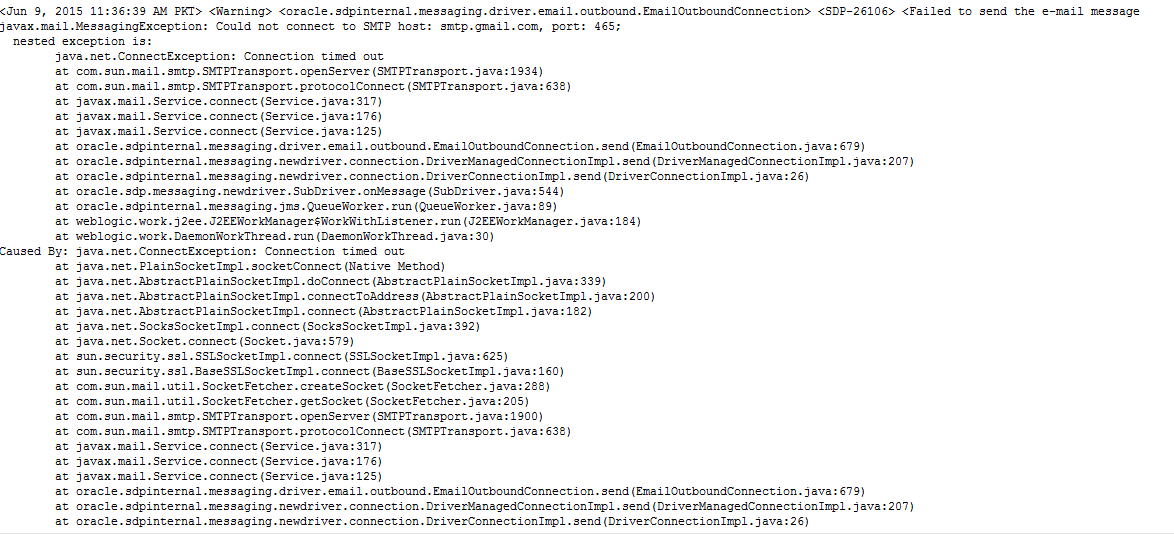
Oracle SOA BPEL Email error Could not connect to SMTP host: smtp.gmail.com

I configured email server in Enterprise Manger and then I used email activity in BPEL to send notifications. But I was facing the below issue. After much troubleshooting I figured it out as network issue. My server was behind proxy server and it was blocking such type traffic then I have to check it with network guy who unblocked this port and then my emails started working properly.

<Warning> <oracle.sdpinternal.messaging.driver.email.outbound.EmailOutboundConnection> <SDP-26106> <Failed to send the e-mail message
javax.mail.MessagingException: Could not connect to SMTP host: smtp.gmail.com, port: 465;
  nested exception is:
        java.net.ConnectException: Connection timed out
        at com.sun.mail.smtp.SMTPTransport.openServer(SMTPTransport.java:1934)

Tuesday, May 5, 2015

SQLDeveloper is not connecting to remote database

I have already written a post on SQL Developer connectivity problem. But recently I got one new error while connecting SQLDeveloper to remote database. First as I mentioned in my last post set proxy if you are using any in your SQLDeveloper and then try to connect it. But If it still gives the error then tried this workaround and I hope it will be helpful too. Sometime when we are connecting more than one internet connection due to any reason like client sides visit, home, office etc, our network connection get increased under network and sharing center and at a time more than one network remain Enable even if they are not connected to any network, so here comes the problem. Disable all of your network you are not using currently like I did in below screenshot and just Enable only network you are currently working with. After doing this try to connect your SQLDeveloper with remote DB again and it should work now and I hope it will be helpful too.

Tuesday, October 28, 2014

Error(24,68): SCAC-50012 Oracle SOA BPEL Error in JDeveloper while building application

I was following one of document/tutorial to implement email notification service in BPEL. But after completing it when I tried to build it, It gave Error(24,68): SCAC-50012. It was so generic error that I could not find exact detailed error. So I did again every step that I did to build application and rebuilt application of completion of each step.

Problem came when I created a BPEL process and I left its Input and output variable as it is. I rebuilt the application and It was fine at that point, then according to tutorial I need to past some XSD elements structure to my newly created XSD file. After doing that when I compiled it gave the above error. It could be because I did not mention Input and output parameter in wizard but added new elements to XSD and It could be some data types related error So I solved it first by designing an XSD and then I created BPEL process and gave Input and output parameter. Just sharing my findings and issue resolution. Hope it might help others too.    

Sunday, July 20, 2014

cfgfwk-64069 the following prerequisite found to be missing

I was getting this error while creating domain for Webcenter content

cfgfwk-64069 the following prerequisite found to be missing oracle enterprise manager

I re-installed Webcenter content and then recreated domain too but the same issue was there. I was unable to see Oracle Enterprise Manager in list.

I was starting domain configuration wizard from command line. I did many work around but in vain. Then I opened command line as an Administrator (Right click on command line and select run as administrator) and then I ran the configuration wizard again and surprisingly i found Enterprise manager in list this time and this solved my issue. I hope It would be helpful for other that's why I am sharing it. 

Monday, February 24, 2014

Oracle Application Adapter error on activating in Weblogic Console resolved

Last couple of days i was facing the following issue when i try to update Apps Adapter in Oracle Weblogic consoleAn error occurred during activation of changes, please see the log for details.
[1] The ra.xml <connection-interface> class 'oracle.tip.adapter.apps.IAppsConnection' was not found in the resource adapter archive/application. 
[2] The ra.xml <connection-impl-class> class 'oracle.tip.adapter.apps.AppsConnection' was not found in the resource adapter archive/application. 
[3] The ra.xml <managedconnectionfactory-class> class 'oracle.tip.adapter.apps.AppsManagedConnectionFactory' was not found in the resource adapter archive/application. 
[4] The ra.xml <connectionfactory-impl-class> class 'oracle.tip.adapter.apps.AppsConnectionFactory' was not found in the resource adapter archive/application.


I was doing following guide to develop a service using Oracle Application Adapter Using Business Events

http://docs.oracle.com/cd/E12839_01/integration.1111/e10537/T430238T430579.htm

but no instance was getting created in Enterprise manager console. then i checked my Apps Adapter in Weblogic console and that was not in OK state. I had configured cluster environment and there were two SOA servers. I had to remove the target from 'cluster' and target it only to WLS_SOA1 server and then i updated and saved it and it started working fine without giving the above error.

Then again i created an Invoice (I was calling invoice Event) and instance created successfully in Enterprise manager console.