Showing posts with label SOA. Show all posts

Thursday, May 11, 2017

[SQLServer]Could not find stored procedure 'master..xp_jdbc_open2'.


Problem:

<Console encountered the following error java.sql.SQLException: [FMWGEN][SQLServer JDBC Driver][SQLServer]Could not find stored procedure 'master..xp_jdbc_open2'.


Workaround:

Go to your Data Source configuration on Weblogic Console and change the Driver Class Name to following:

weblogic.jdbc.sqlserver.SQLServerDriver

These are the drivers for NonXA data source. 

However if you want to create an XA connection with MS SQL server then some configuration are required at MS SQL side. 

Go to /fmwinfra/oracle_common/modules/datadirect of your weblogic installation directory. Copy these two files instjdbc.sql and x64sqljdbc.dll if you are using 64 bit SQL server otherwise select as per version from the same directory to MS  SQL Installation bin directory. 

Execute instjdbc.sql  in MS SQL server. Now create XA data source in your weblogic server. It should work. If there are multiple SQL servers then you will have to do the same configuration on all SQL servers. Hope this will help. 

Conversion of type '' whose JDBC type is OTHER to a Java object is not supported.


While calling a Store procedure from MS SQL server, following issue can come

Problem:
Conversion of type 365366 whose JDBC type is OTHER to a Java object is not supported.
An attempt was made to convert type 365366 to a Java object using an unsupported JDBC type: OTHER.
; nested exception is: 
BINDING.JCA-11800
Unimplemented object conversion.
Conversion of type 365366 whose JDBC type is OTHER to a Java object is not supported.
An attempt was made to convert type 365366 to a Java object using an unsupported JDBC type: OTHER.
Use a data type with a supported JDBC type.


Solution:

Go to your Database adapter connection factory and change PlateformClassName from
org.eclipse.persistence.platform.database.Oracle10Platform

To
oracle.toplink.platform.database.SQLServerPlatform


Caused by java.sql.SQLException: Cannot call Connection.commit in distributed transaction

Problem:
unknown failed. Descriptor name: [unknown].
Caused by java.sql.SQLException: Cannot call Connection.commit in distributed transaction.  Transaction Manager will commit the resource manager when the distributed transaction is committed..
; nested exception is: 
BINDING.JCA-11616
DBWriteInteractionSpec Execute Failed Exception.
unknown failed. Descriptor name: [unknown].
Caused by java.sql.SQLException: Cannot call Connection.commit in distributed transaction.  Transaction Manager will commit the resource manager when the distributed transaction is committed..
Please see the logs for the full DBAdapter logging output prior to this exception.  This exception is considered retriable, likely due to a communication failure.  To classify it as non-retriable instead add property nonRetriableErrorCodes with value "0" to your deployment descriptor (i.e. weblogic-ra.xml).  To auto retry a retriable fault set these composite.xml properties for this invoke: jca.retry.interval, jca.retry.count, and jca.retry.backoff.  All properties are integers.


Workaround:

Uncheck Support global transaction option in data source Transaction section as shown below:


Sunday, December 18, 2016

Resolved:Connection refused: connect. CFGFWK-60850: Test Failed!

While extending SOA domain for OSB, we can come across the following issue


Component Schema=OSB JMS Reporting Provider Driver=org.apache.derby.jdbc.ClientDriver
URL=jdbc:derby://localhost:1527/osbexamples;ServerName=localhost;databaseName=osbexamples
User=DEV_SOAINFRA Password=******** SQL Test=SELECT 1 FROM SYS.SYSTABLES  java.net.ConnectException :
 Error connecting to server localhost on port 1527 with message Connection refused: connect. CFGFWK-60850:  Test Failed!

OR

SQL Test=SELECT 1 FROM SYS.SYSTABLES  Insufficient data while reading from the network - expected a minimum of 6 bytes and received only 0 bytes.  The connection has been terminated. CFGFWK-60850:  Test Failed!

Solution:

This issue occurs due to wrong password, vendor or service name. To resolve this issue just make sure database connection string is fine as shown below:


Tuesday, October 18, 2016

There is not an activity (receive/pick) to start the process

Sometimes when we create SOA BPEL with define service interface later, we get the below error even if we add the receive activity.

  • Error(52): There is not an activity (receive/pick) to start the process
  • Error(52): Initial activity is invalid. An initial activity must be of a receive or pick activity.
  • Error: there is no receive activity that starts the process 
Following is the error snapshot:
To resolve this issue open BPEL process in code view and changed the 'no' in receive activity to 'yes' as shown below

Before:
   <receive name="ReceiveInput" createInstance="no"
             variable="Receive1_Request-Response_InputVariable"
             partnerLink="HttpGet" portType="ns1:Request_Response_ptt"
             operation="Request-Response"/>
After
   <receive name="ReceiveInput" createInstance="yes"
             variable="Receive1_Request-Response_InputVariable"
             partnerLink="HttpGet" portType="ns1:Request_Response_ptt"
             operation="Request-Response"/>

Monday, October 17, 2016

Error occurred during initialization of VM

After fresh installation of Oracle SOA, I started getting the below error while starting servers.

Error occurred during initialization of VM
Could not reserve enough space for object heap
Could not create the Java virtual machine.

After trying different solution from the Web I changed the JDK version and it started working fine. I was using C:\Oracle\Middleware\jdk160_24 JDK previously which did not work and then I updated it with C:\Program Files\Java\jdk1.8.0_51 in setDomainEnv file and it started working fine. 

Monday, May 2, 2016

BPM Timer Process java.lang.NoClassDefFoundError: oracle/bpm/runtime/quartz/trigger/TriggerWithReschedule


Following issue came because one of the library could not be loaded. So you need to add that library to lib directory of your SOA domain.

Go to the /oracle/Middleware/Oracle_SOA1/soa/modules and then copy the oracle.bpm.runtime.classloader-util.jar jar file.

Go to /oracle/Middleware/user_projects/domains/[domain_name]/lib directory and past that file.

restart the servers, hope this will help.

javax.ejb.EJBException: EJB Exception: : java.lang.NoClassDefFoundError: oracle/bpm/runtime/quartz/trigger/TriggerWithReschedule
at oracle.bpm.bpmn.engine.model.runtime.util.SchedulingHelper.schedule(SchedulingHelper.java:46)
at oracle.bpm.bpmn.engine.model.TimerStartEventScheduler.schedule(TimerStartEventScheduler.java:172)
at oracle.bpm.bpmn.engine.ejb.impl.BPMNServerManagerBean.scheduleStartTimerEvents(BPMNServerManagerBean.java:261)
at sun.reflect.NativeMethodAccessorImpl.invoke0(Native Method)
at sun.reflect.NativeMethodAccessorImpl.invoke(NativeMethodAccessorImpl.java:39)
at sun.reflect.DelegatingMethodAccessorImpl.invoke(DelegatingMethodAccessorImpl.java:25)
at java.lang.reflect.Method.invoke(Method.java:597)
at com.bea.core.repackaged.springframework.aop.support.AopUtils.invokeJoinpointUsingReflection(AopUtils.java:310)
at com.bea.core.repackaged.springframework.aop.framework.ReflectiveMethodInvocation.invokeJoinpoint(ReflectiveMethodInvocation.java:182)
at com.bea.core.repackaged.springframework.aop.framework.ReflectiveMethodInvocation.proceed(ReflectiveMethodInvocation.java:149)
at com.bea.core.repackaged.springframework.aop.support.DelegatingIntroductionInterceptor.doProceed(DelegatingIntroductionInterceptor.java:131)
at com.bea.core.repackaged.springframework.aop.support.DelegatingIntroductionInterceptor.invoke(DelegatingIntroductionInterceptor.java:119)
at com.bea.core.repackaged.springframework.aop.framework.ReflectiveMethodInvocation.proceed(ReflectiveMethodInvocation.java:171)
at com.bea.core.repackaged.springframework.jee.spi.MethodInvocationVisitorImpl.visit(MethodInvocationVisitorImpl.java:37)
at weblogic.ejb.container.injection.EnvironmentInterceptorCallbackImpl.callback(EnvironmentInterceptorCallbackImpl.java:54)
at com.bea.core.repackaged.springframework.jee.spi.EnvironmentInterceptor.invoke(EnvironmentInterceptor.java:50)
at com.bea.core.repackaged.springframework.aop.framework.ReflectiveMethodInvocation.proceed(ReflectiveMethodInvocation.java:171)
at com.bea.core.repackaged.springframework.aop.interceptor.ExposeInvocationInterceptor.invoke(ExposeInvocationInterceptor.java:89)
at com.bea.core.repackaged.springframework.aop.framework.ReflectiveMethodInvocation.proceed(ReflectiveMethodInvocation.java:171)
at com.bea.core.repackaged.springframework.aop.support.DelegatingIntroductionInterceptor.doProceed(DelegatingIntroductionInterceptor.java:131)
at com.bea.core.repackaged.springframework.aop.support.DelegatingIntroductionInterceptor.invoke(DelegatingIntroductionInterceptor.java:119)
at com.bea.core.repackaged.springframework.aop.framework.ReflectiveMethodInvocation.proceed(ReflectiveMethodInvocation.java:171)
at com.bea.core.repackaged.springframework.aop.framework.JdkDynamicAopProxy.invoke(JdkDynamicAopProxy.java:204)
at $Proxy287.scheduleStartTimerEvents(Unknown Source)
at oracle.bpm.bpmn.engine.ejb.impl.BPMNServerManagerBean_6gbx7k_IBPMNCubeServerManagerLocalBeanImpl.__WL_invoke(Unknown Source)
at weblogic.ejb.container.internal.SessionLocalMethodInvoker.invoke(SessionLocalMethodInvoker.java:39)
at oracle.bpm.bpmn.engine.ejb.impl.BPMNServerManagerBean_6gbx7k_IBPMNCubeServerManagerLocalBeanImpl.scheduleStartTimerEvents(Unknown Source)
at oracle.bpm.bpmn.engine.service.BPMNServiceEngine.scheduleStartTimerEvents(BPMNServiceEngine.java:1398)
at oracle.bpm.bpmn.engine.service.BPMNServiceEngine.postDeployComponent(BPMNServiceEngine.java:1131)
at oracle.bpm.bpmn.engine.service.BPMNServiceEngine.internalPostDeployComponent(BPMNServiceEngine.java:1353)
at oracle.bpm.bpmn.engine.service.BPMNServiceEngine.onApplicationEvent(BPMNServiceEngine.java:1073)
at org.springframework.context.event.SimpleApplicationEventMulticaster$1.run(SimpleApplicationEventMulticaster.java:78)
at org.springframework.core.task.SyncTaskExecutor.execute(SyncTaskExecutor.java:49)
at org.springframework.context.event.SimpleApplicationEventMulticaster.multicastEvent(SimpleApplicationEventMulticaster.java:76)
at org.springframework.context.support.AbstractApplicationContext.publishEvent(AbstractApplicationContext.java:274)
at oracle.integration.platform.blocks.deploy.DeploymentEventPublisher.invoke(DeploymentEventPublisher.java:93)
at org.springframework.aop.framework.ReflectiveMethodInvocation.proceed(ReflectiveMethodInvocation.java:171)
at org.springframework.transaction.interceptor.TransactionInterceptor.invoke(TransactionInterceptor.java:106)
at org.springframework.aop.framework.ReflectiveMethodInvocation.proceed(ReflectiveMethodInvocation.java:171)
at org.springframework.aop.framework.JdkDynamicAopProxy.invoke(JdkDynamicAopProxy.java:204)
at $Proxy374.deploy(Unknown Source)
at oracle.integration.platform.kernel.FabricKernelInitializerServlet$1.run(FabricKernelInitializerServlet.java:819)
at oracle.integration.platform.blocks.executor.WorkManagerExecutor$1.run(WorkManagerExecutor.java:120)
at weblogic.work.j2ee.J2EEWorkManager$WorkWithListener.run(J2EEWorkManager.java:183)
at weblogic.work.DaemonWorkThread.run(DaemonWorkThread.java:30)
Caused by: java.lang.ClassNotFoundException: oracle.bpm.runtime.quartz.trigger.TriggerWithReschedule

Tuesday, December 1, 2015

java.sql.SQLException: ResultSet.next was not called Oracle JDeveloper, B2B Callout

While running a Java code of B2B callout i was getting the below error. This was due to below Java code. The commented code was causing the problem then i defined it in if statement as shown below. I hope you understand the reason.


 PreparedStatement pstmt = conn.prepareStatement("My select query=?");
        pstmt.setInt(1, Integer.parseInt(SequenceNum));
     
   ResultSet rs = pstmt.executeQuery();
               //  TR=rs.getString(1);
              //  System.out.println("TR is " +TR);
      if (rs.next())
     {
                    TR=rs.getString(1);
                    System.out.println("TR is " +TR);
        
      }


java.sql.SQLException: ResultSet.next was not called
at weblogic.rjvm.ResponseImpl.unmarshalReturn(ResponseImpl.java:234)
at weblogic.rmi.internal.BasicRemoteRef.invoke(BasicRemoteRef.java:223)
at weblogic.jdbc.rmi.internal.ResultSetImpl_weblogic_jdbc_wrapper_ResultSet_oracle_jdbc_driver_OracleResultSetImpl_1035_WLStub.getString(Unknown Source)
at weblogic.jdbc.rmi.internal.ResultSetStub_weblogic_jdbc_rmi_internal_ResultSetImpl_weblogic_jdbc_wrapper_ResultSet_oracle_jdbc_driver_OracleResultSetImpl_1035_WLStub.getString(Unknown Source)
at weblogic.jdbc.rmi.internal.ResultSetStraightReader.getString(ResultSetStraightReader.java:45)
at weblogic.jdbc.rmi.SerialResultSet.getString(SerialResultSet.java:150)
at DBInserterMT100.dbInserter(DBInserterMT100.java:105)
at DBInserterMT100.execute(DBInserterMT100.java:55)
at oracle.tip.b2b.callout.CalloutExecuteWorker.doWork(CalloutExecuteWorker.java:288)
at oracle.tip.b2b.callout.CalloutExecuteWorker.run(CalloutExecuteWorker.java:258)
at oracle.integration.platform.blocks.executor.WorkManagerExecutor$1.run(WorkManagerExecutor.java:120)
at weblogic.work.j2ee.J2EEWorkManager$WorkWithListener.run(J2EEWorkManager.java:183)
at weblogic.work.ExecuteThread.execute(ExecuteThread.java:209)
at weblogic.work.ExecuteThread.run(ExecuteThread.java:178)
Caused by: java.sql.SQLException: ResultSet.next was not called
at oracle.jdbc.driver.OracleResultSetImpl.getString(OracleResultSetImpl.java:2870)
at weblogic.jdbc.wrapper.ResultSet_oracle_jdbc_driver_OracleResultSetImpl.getString(Unknown Source)
at weblogic.jdbc.rmi.internal.ResultSetImpl_weblogic_jdbc_wrapper_ResultSet_oracle_jdbc_driver_OracleResultSetImpl.getString(Unknown Source)
at weblogic.jdbc.rmi.internal.ResultSetImpl_weblogic_jdbc_wrapper_ResultSet_oracle_jdbc_driver_OracleResultSetImpl_WLSkel.internalInvoke1(Unknown Source)
at weblogic.jdbc.rmi.internal.ResultSetImpl_weblogic_jdbc_wrapper_ResultSet_oracle_jdbc_driver_OracleResultSetImpl_WLSkel.invoke(Unknown Source)
at weblogic.rmi.internal.BasicServerRef.invoke(BasicServerRef.java:667)
at weblogic.rmi.internal.BasicServerRef$1.run(BasicServerRef.java:522)
at weblogic.security.acl.internal.AuthenticatedSubject.doAs(AuthenticatedSubject.java:363)
at weblogic.security.service.SecurityManager.runAs(SecurityManager.java:146)
at weblogic.rmi.internal.BasicServerRef.handleRequest(BasicServerRef.java:518)
at weblogic.rmi.internal.wls.WLSExecuteRequest.run(WLSExecuteRequest.java:118)
... 2 more

javax.naming.CommunicationException [Root exception is java.net.ConnectException: t3: Destination unreachable

While compiling some code in JDeveloper I was getting the below error. It was coming due to proxy issue. So go to Jdeveloper then Tools---Preferences---Web Browser and Proxy then in exceptions field enter your server hostname. Test your code again and this time hopefully error will not come. It resolved my issue and i hope it will be helpful.


SEVERE: javax.naming.CommunicationException [Root exception is java.net.ConnectException: t3://hostname:port: Destination unreachable; nested exception is: 
java.net.ProtocolException: unrecognized response from proxy: 'HTTP/1.1 502 Proxy Error ( The specified Secure Sockets Layer (SSL) port is not allowed. Forefront TMG is not configured to allow SSL requests from this port. Most Web browsers use port 443 for SSL requests.  )'; No available router to destination]
oracle.bpel.services.workflow.client.WorkflowServiceClientException: javax.naming.CommunicationException [Root exception is java.net.ConnectException: t3://hostname:port: Destination unreachable; nested exception is: 
java.net.ProtocolException: unrecognized response from proxy: 'HTTP/1.1 502 Proxy Error ( The specified Secure Sockets Layer (SSL) port is not allowed. Forefront TMG is not configured to allow SSL requests from this port. Most Web browsers use port 443 for SSL requests.  )'; No available router to destination]
at oracle.bpel.services.workflow.client.WorkflowServiceClientContext.createInitialContext(WorkflowServiceClientContext.java:793)
at oracle.bpel.services.workflow.client.WorkflowServiceClientContext.getJNDIInitialContext(WorkflowServiceClientContext.java:423)
at oracle.bpel.services.workflow.query.client.TaskQueryServiceRemoteClient.getInitialContext(TaskQueryServiceRemoteClient.java:47)
at oracle.bpel.services.workflow.query.client.TaskQueryServiceRemoteClient.authenticate(TaskQueryServiceRemoteClient.java:90)
at sun.reflect.NativeMethodAccessorImpl.invoke0(Native Method)
at sun.reflect.NativeMethodAccessorImpl.invoke(NativeMethodAccessorImpl.java:39)
at sun.reflect.DelegatingMethodAccessorImpl.invoke(DelegatingMethodAccessorImpl.java:25)
at java.lang.reflect.Method.invoke(Method.java:597)
at oracle.bpel.services.workflow.client.WFClientRetryInvocationHandler.invokeTarget(WFClientRetryInvocationHandler.java:144)
at oracle.bpel.services.workflow.client.WFClientRetryInvocationHandler.invoke(WFClientRetryInvocationHandler.java:82)
at $Proxy14.authenticate(Unknown Source)
at nl.whitehorses.fcforms.tasks.utility.BPELWorkflowServices.authenticate(BPELWorkflowServices.java:191)
at nl.whitehorses.fcforms.tasks.services.HumanTaskClient.completeTask(HumanTaskClient.java:265)
at nl.whitehorses.fcforms.tasks.test.Complete.<init>(Complete.java:9)
at nl.whitehorses.fcforms.tasks.test.Complete.main(Complete.java:14)
Caused by: javax.naming.CommunicationException [Root exception is java.net.ConnectException: t3://hostname:port: Destination unreachable; nested exception is: 
java.net.ProtocolException: unrecognized response from proxy: 'HTTP/1.1 502 Proxy Error ( The specified Secure Sockets Layer (SSL) port is not allowed. Forefront TMG is not configured to allow SSL requests from this port. Most Web browsers use port 443 for SSL requests.  )'; No available router to destination]
at weblogic.jndi.internal.ExceptionTranslator.toNamingException(ExceptionTranslator.java:40)
at weblogic.jndi.WLInitialContextFactoryDelegate.toNamingException(WLInitialContextFactoryDelegate.java:788)
at weblogic.jndi.WLInitialContextFactoryDelegate.getInitialContext(WLInitialContextFactoryDelegate.java:368)
at weblogic.jndi.Environment.getContext(Environment.java:315)
at weblogic.jndi.Environment.getContext(Environment.java:285)
at weblogic.jndi.WLInitialContextFactory.getInitialContext(WLInitialContextFactory.java:117)
at javax.naming.spi.NamingManager.getInitialContext(NamingManager.java:667)
at javax.naming.InitialContext.getDefaultInitCtx(InitialContext.java:288)
at javax.naming.InitialContext.init(InitialContext.java:223)
at javax.naming.InitialContext.<init>(InitialContext.java:197)
at oracle.bpel.services.workflow.client.WorkflowServiceClientContext.createInitialContext(WorkflowServiceClientContext.java:789)
... 14 more
Caused by: java.net.ConnectException: t3://hostname:port: Destination unreachable; nested exception is: 
java.net.ProtocolException: unrecognized response from proxy: 'HTTP/1.1 502 Proxy Error ( The specified Secure Sockets Layer (SSL) port is not allowed. Forefront TMG is not configured to allow SSL requests from this port. Most Web browsers use port 443 for SSL requests.  )'; No available router to destination
at weblogic.rjvm.RJVMFinder.findOrCreateInternal(RJVMFinder.java:216)
at weblogic.rjvm.RJVMFinder.findOrCreate(RJVMFinder.java:170)
at weblogic.rjvm.ServerURL.findOrCreateRJVM(ServerURL.java:153)
at weblogic.jndi.WLInitialContextFactoryDelegate.getInitialContext(WLInitialContextFactoryDelegate.java:353)
... 22 more
Caused by: java.rmi.ConnectException: Destination unreachable; nested exception is: 
java.net.ProtocolException: unrecognized response from proxy: 'HTTP/1.1 502 Proxy Error ( The specified Secure Sockets Layer (SSL) port is not allowed. Forefront TMG is not configured to allow SSL requests from this port. Most Web browsers use port 443 for SSL requests.  )'; No available router to destination
at weblogic.rjvm.ConnectionManager.bootstrap(ConnectionManager.java:470)
at weblogic.rjvm.ConnectionManager.bootstrap(ConnectionManager.java:321)
at weblogic.rjvm.RJVMManager.findOrCreateRemoteInternal(RJVMManager.java:254)
at weblogic.rjvm.RJVMManager.findOrCreate(RJVMManager.java:197)
at weblogic.rjvm.RJVMFinder.findOrCreateRemoteServer(RJVMFinder.java:238)
at weblogic.rjvm.RJVMFinder.findOrCreateInternal(RJVMFinder.java:200)
... 25 more
Exception in thread "main" java.lang.RuntimeException: javax.naming.CommunicationException [Root exception is java.net.ConnectException: t3://hostname:port: Destination unreachable; nested exception is: 
java.net.ProtocolException: unrecognized response from proxy: 'HTTP/1.1 502 Proxy Error ( The specified Secure Sockets Layer (SSL) port is not allowed. Forefront TMG is not configured to allow SSL requests from this port. Most Web browsers use port 443 for SSL requests.  )'; No available router to destination]
at nl.whitehorses.fcforms.tasks.services.HumanTaskClient.completeTask(HumanTaskClient.java:280)
at nl.whitehorses.fcforms.tasks.test.Complete.<init>(Complete.java:9)
at nl.whitehorses.fcforms.tasks.test.Complete.main(Complete.java:14)

Friday, September 4, 2015

java.security.PrivilegedActionException: weblogic.common.ResourceException Oracle SOA

java.security.PrivilegedActionException: weblogic.common.ResourceException: java.security.PrivilegedActionException: weblogic.common.ResourceException: No credential mapper entry found for password indirection user=apps for data source DataSourceName

While creating a war file and then deploying on weblogic we get this error. To get ride of this error in Jdeveloper go to application properties and then deployments and then uncheck "Auto Generate and Synchronize weblogic-jdbc.xml Descriptors During Deployment"

then create WAR file again and deploy it again and this error will be no more

Error(1,1)mdssys/mdx/componentType.rdf: XML-20108: (Fatal Error) Start of root element expected.

 Error(1,1)mdssys/mdx/componentType.rdf<Line 1, Column 1>: XML-20108: (Fatal Error) Start of root element expected.

Sometimes when we build Oracle SOA project we get the above error. To resolve this issue just go to those file where this error is coming you can see this from compiler and remove those file or add following in those files 

<xml version="1.0" encoding="UTF-8"/> 

Save it and rebuild the code again and this error will be no more.

Oracle SOA Business rule Fact not found in the rule engine working memory

The following error comes sometimes in Oracle SOA suite business rule.

Fact not found in the rule engine working memory, rule session execution failed. This is most likely a rule modeling error.

I was facing the same issue while working on business rule. The error was coming due to schema issues or namespace issues in schema. If you create a separate application and test this using the same schema the chances of error would be very less. I just created a new XSD with new target namespace and copy pasted the existing elements/complex elements into new xsd not namespaces, then it started working fine. 

Monday, June 8, 2015

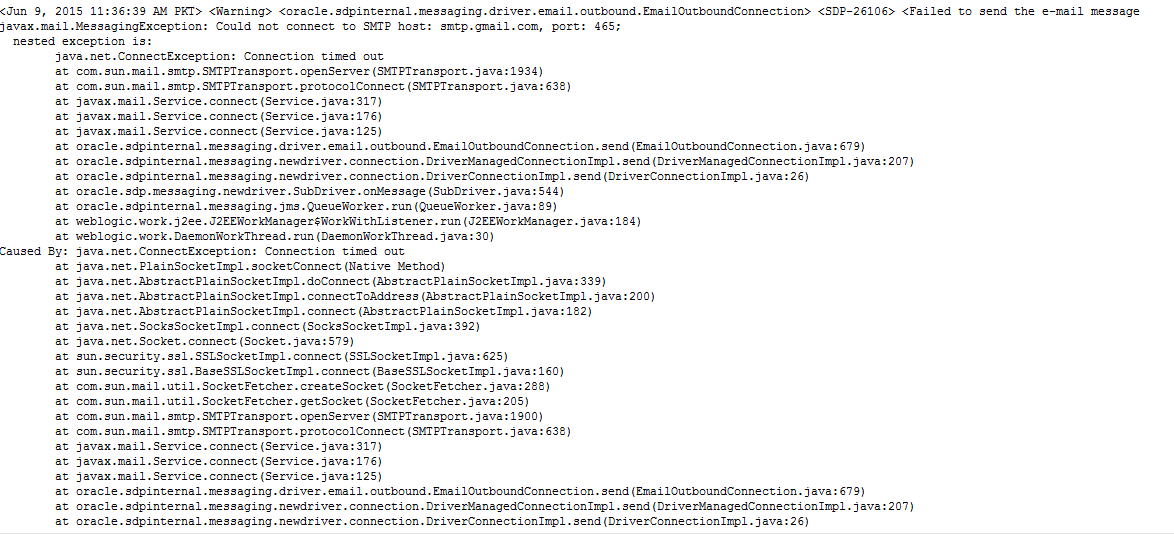
Oracle SOA BPEL Email error Could not connect to SMTP host: smtp.gmail.com

I configured email server in Enterprise Manger and then I used email activity in BPEL to send notifications. But I was facing the below issue. After much troubleshooting I figured it out as network issue. My server was behind proxy server and it was blocking such type traffic then I have to check it with network guy who unblocked this port and then my emails started working properly.

<Warning> <oracle.sdpinternal.messaging.driver.email.outbound.EmailOutboundConnection> <SDP-26106> <Failed to send the e-mail message
javax.mail.MessagingException: Could not connect to SMTP host: smtp.gmail.com, port: 465;
  nested exception is:
        java.net.ConnectException: Connection timed out
        at com.sun.mail.smtp.SMTPTransport.openServer(SMTPTransport.java:1934)

Wednesday, April 29, 2015

OPatch command error, Oracle SOA 12c opatch commad

I was executing opatch command to know about version but I had been facing the following error. I could not understand why is it happening. Then I used the correct path of JDK with below command an it worked.
[oracle@bpm01 OPatch]$ ./opatch lsinventory
Exception in thread "main" java.lang.UnsupportedClassVersionError: com/oracle/cie/gdr/external/InventoryException : Unsupported major.minor version 51.0
        at java.lang.ClassLoader.defineClass1(Native Method)
        at java.lang.ClassLoader.defineClassCond(ClassLoader.java:631)
        at java.lang.ClassLoader.defineClass(ClassLoader.java:615)
        at java.security.SecureClassLoader.defineClass(SecureClassLoader.java:141)
        at java.net.URLClassLoader.defineClass(URLClassLoader.java:283)
        at java.net.URLClassLoader.access$000(URLClassLoader.java:58)
        at java.net.URLClassLoader$1.run(URLClassLoader.java:197)
        at java.security.AccessController.doPrivileged(Native Method)
        at java.net.URLClassLoader.findClass(URLClassLoader.java:190)
        at java.lang.ClassLoader.loadClass(ClassLoader.java:306)
        at sun.misc.Launcher$AppClassLoader.loadClass(Launcher.java:301)
        at java.lang.ClassLoader.loadClass(ClassLoader.java:247)
        at oracle.opatch.OPatch.main(OPatch.java:548)

OPatch failed with error code 1
[oracle@bpm01 OPatch]$

Here is the command with JDK path in linux

[oracle@bpm01 OPatch]$ ./opatch lsinventory -jdk /usr/java/jdk1.7.0_75

OPatch Version : 13.2.0.0.0
  OUI  Version : 12.1.0.1.0
The OPatch version is not applicable for current OUI version.

Since OUI Version starts with 12.1, Please go to 'My Oracle Support' and get right OPatch 12.1.*.*.* based on patch 6880880, release version 12.1.0.0.0 and appropriate platform.
 I hope it could be helpful if someone faces this issue.

Tuesday, April 28, 2015

Oracle SOA Suite 12C search Instances by Flow ID

Well, its very simple post but you can face problem when use Oracle SOA suite 12c to search specific instance by using Flow ID  . If you have worked with Oracle SOA suite 11g, You would have observed search criteria which is very simple but in 12C, search criteria is little advance. I want to search instance by using Flow ID but in first glance I could not.

To do this click on Add/Remove filters in search window and then check flow instance. Default this option is unchecked but I think it should be checked. Following is the screenshot for detailed description.

Sunday, November 30, 2014

Oracle SOA file adapter example part 2

Continuing from previous part Oracle SOA file adapter examples using mediator, will will now configure File Adapter to write file.

1)  Drag and drop a file adapter in External references lane. Name it as "WriteFileAdapter" click next and then again next on operation window select Write File. Click next again and on file configuration window give directory path where you want to write your file like i did and also give file naming convention.

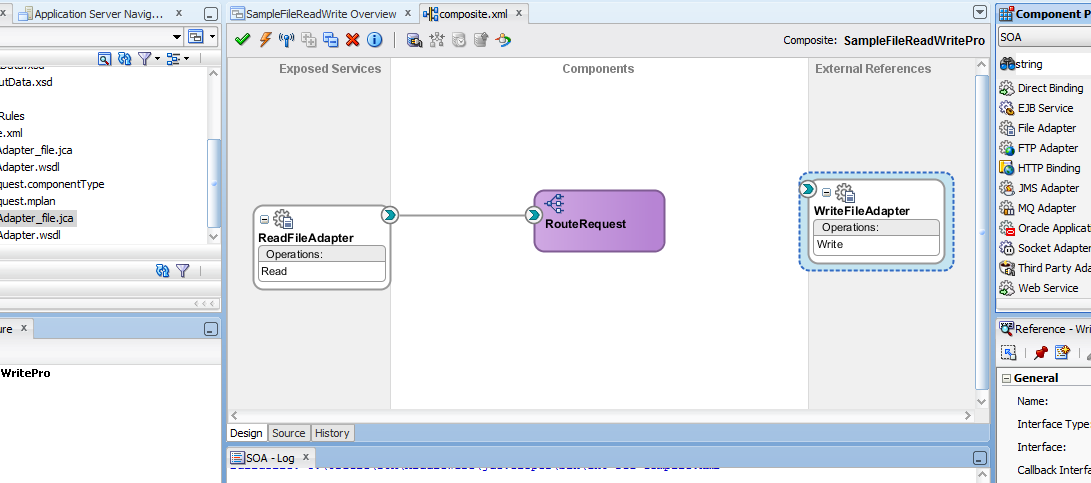
2) Click next to move on Messages window. click browse for schema file icon and select Writefile from OutputData.xsd. click next and finish the file creation wizard.your composite will now look like as shown below.
3) Now double click on your Mediator component "RouteRequest" It will open .mplan file, click on green + icon and select static routing rule. A popup will come then click on service as we are going to call a service.
4) From preferences select write under WriteFileAdapter. Now we will create a mapping file to map input and output files. Click on transform icon and create a new mapping file as shown below.
 6) Now map firstName with fName and lastName with LName as shown below

7) Now deploy your project on SOA server by directly using JDeveloper or create an SAR file and deploy manually. I suppose you have an idea how to deploy composite on server.
Copy the below lines and create new xml file, then put this file to your file reading directory wait at least some seconds max 1 minute. Your file will get delete from read file directory and will be written in your output file directory, Please check to verify. Lets see instance on enterprise manager.
XML file to use

<?xml version="1.0" encoding="UTF-8" ?>
<!--  $Header: sampleinput.xml 18-may-2007.04:44:38 mahnaray Exp $ -->
<ReadFile xmlns="http://TargetNamespace.com/readFile">
   <ReadFiles>
      <FirstName>Muhammad</FirstName>
 <LastName>Nasir</LastName>
   </ReadFiles>
</ReadFile>


You can expand flow trace to check process execution. Now you can check your write file directory as shown below.
Now you have learned how to configure SOA file adapter for file read and file write. You have learned how to configure and use Oracle Mediator and how to create transformation file. Please don't hesitate to comment if you find any problem.

Oracle SOA File read and Write example using Mediator and File Adapter

The main aim of this post is to show how we can use Mediator in SOA suite and how to configure file read and write adapters. This case could be useful in many cases. This is just a sample example and in real world you can design more complex scenarios using Mediator component. But this post will give you good information how to work with Mediator.

In this post we are going to read an xml file using read operation of file adapter and then we will write this to a file by using another file adapter component.

1) Create a new SOA application using JDeveloper and give name as "SampleFileReadWrite" and click next and name your project as "SampleFileReadWritePro" make sure SOA is select click next and then finish with Empty Composite Template


2) Now we are going to create two XSD files for our File Adapter. This will show how to create an XSD file in SOA. It is schema file that defines input and output of different services. In you project right click on xsd folder. Give name as "InputData" and click OK.

3) Click on the source view of your newly created file, Copy the below XML and past(override) into your InputData file.

<?xml version="1.0" encoding="UTF-8" ?>

<xsd:schema xmlns:xsd="http://www.w3.org/2001/XMLSchema"
            xmlns:nxsd="http://xmlns.oracle.com/pcbpel/nxsd"
            xmlns:tns="http://TargetNamespace.com/readFile"
            targetNamespace="http://TargetNamespace.com/readFile"
            elementFormDefault="qualified"
            attributeFormDefault="unqualified">
  <xsd:element name="ReadFile">
    <xsd:complexType>
      <xsd:sequence>
        <xsd:element name="ReadFiles" minOccurs="1" maxOccurs="unbounded">
          <xsd:complexType>
            <xsd:sequence>
              <xsd:element name="FirstName" type="xsd:string"/>
             <xsd:element name="LastName" type="xsd:string"/>
            </xsd:sequence>
          </xsd:complexType>
        </xsd:element>
      </xsd:sequence>
    </xsd:complexType>
  </xsd:element>

</xsd:schema>

4) Similarly create a another XSD file named as "OutputData" and copy below data in it.

<?xml version="1.0" encoding="UTF-8" ?>

<xsd:schema xmlns:xsd="http://www.w3.org/2001/XMLSchema"
            xmlns:nxsd="http://xmlns.oracle.com/pcbpel/nxsd"
            xmlns:tns="http://TargetNamespace.com/readFile"
            targetNamespace="http://TargetNamespace.com/readFile"
            elementFormDefault="qualified"
            attributeFormDefault="unqualified">
  <xsd:element name="Writefile">
    <xsd:complexType>
      <xsd:sequence>
        <xsd:element name="WriteFiles" minOccurs="1" maxOccurs="unbounded">
          <xsd:complexType>
            <xsd:sequence>
              <xsd:element name="FName" type="xsd:string"/>
             <xsd:element name="LName" type="xsd:string"/>
            </xsd:sequence>
          </xsd:complexType>
        </xsd:element>
      </xsd:sequence>
    </xsd:complexType>
  </xsd:element>

</xsd:schema>

5) Now click on composite.xml file to open it if its not open already. Drag and Drop a Mediator in Components pallet of composite and give name as "RouteRequest" and select "Define Interface later " as template if not selected already.

6) Now lets configure an inbound File Adapter for file reading. Drag and Drop a File adapter Component in Exposed Services swim-lane. Give name as "ReadFileAdapter"  Click Next then again next and from Operation window select "Read File" as operation type and again click next. On file directories window, give some physical path where your server reside as shown below in my case.
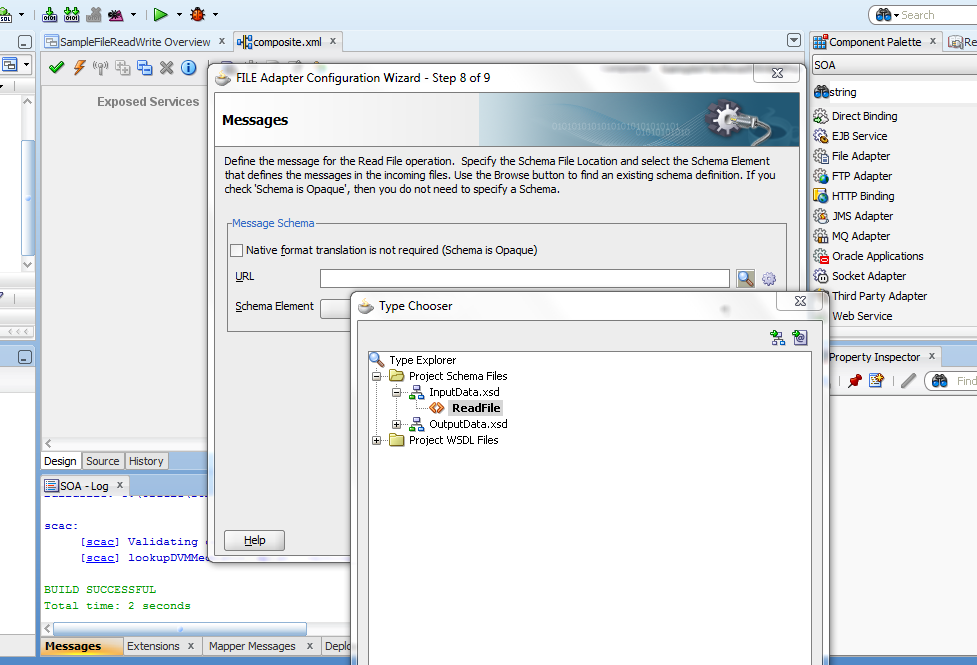
7) Click next to move on File Filtering window. Enter *.xml in Include files with name pattern. click next and let the polling frequency as it is i.e 1.  Click next to move on Messages Window. At the end of URL field click on browse for scheme file icon. Expand project schema file and select readfile under InputData.xsd as shown below
8) Click next and finish the file adapter wizard. Now drag a wire from ReadFileAdapter to RouteRequest mediator. Your composite will look like this now 
Now in next part of this post I will configure File Adapter to write in a file and then will will deploy this application on SOA server and test it.
Click to move on part 2 of this post

Tuesday, October 28, 2014

Error(24,68): SCAC-50012 Oracle SOA BPEL Error in JDeveloper while building application

I was following one of document/tutorial to implement email notification service in BPEL. But after completing it when I tried to build it, It gave Error(24,68): SCAC-50012. It was so generic error that I could not find exact detailed error. So I did again every step that I did to build application and rebuilt application of completion of each step.

Problem came when I created a BPEL process and I left its Input and output variable as it is. I rebuilt the application and It was fine at that point, then according to tutorial I need to past some XSD elements structure to my newly created XSD file. After doing that when I compiled it gave the above error. It could be because I did not mention Input and output parameter in wizard but added new elements to XSD and It could be some data types related error So I solved it first by designing an XSD and then I created BPEL process and gave Input and output parameter. Just sharing my findings and issue resolution. Hope it might help others too.    

Sunday, August 17, 2014

Internet of things (IoT), Oracle Internet of things

The inter connection of uniquely identifiable embedded computer like devices within an existing internet infrastructure is refers as Internet of things (IoT).  There is plenty of research and development going on in this field. Business men smell new opportunities of business in this area. Because of ubiquity nature of these devices, the number of devices will increase dramatically in near future.

The more and more of these devices are coming into market and consuming a huge amount of IP addresses. But due to the shortage of IPv4 IP addresses the need of IPv6 has increased intensively. So any research and development of IPv6 would be having a great impact on IoT. There are plenty of new IoT applications coming day by day. The importance of IoT devices and components data has increased.  So now some companies like Oracle providing framework to get this huge amount of data and process it to get valuable information of it.
Oracle provides an infrastructure to integrate and get these devices data securely and easily. Oracle IoT platform provides analytics capabilities and security of data, devices and users. Oracle SOA and BPM suite help integration of IoT with different enterprise application including cloud. For security Oracle IDM can be used and for mobility we can use Oracle mobile platform.

The internet of things (IoT) components and devices generate huge amount of useful data that can be collect and use to get useful information. Well to collect and use this data to gain valuable information is still going on and many developments have already done in this field. The difficulty to get and use this data is because of security, management of data and ever increasing of IoT components. 

Sunday, August 3, 2014

Oracle SOA Suite Mediator component

Oracle mediator provides mediation capabilities like transformation, selective routing and validation. It also provides message exchange patterns like synchronous, asynchronous, and event punishing or subscription. It provide a light weight framework for mediation in intra-composite components such as human workflow, business process etc.

Mediator can transform data from one format to another i.e we can give text file data and then after transformation we can send it to database. You can also use mediator component to consume a business event and for receiving service invocation. It helps integration between event and services. You can define rules based on message payload or header in mediator. You can select any attribute to make a routing rule. You can also set execution type of router either parallel or in sequence.