Tuesday, June 24, 2014

Oracle SOA Certification and Interview questions Part 1


1) Receives messages from the service providers or external partners through SOAP
services or adapters
a) Service Infrastructure                        
b) Service engines

2) A ----- deployed to the same infrastructure must have a unique name across
SOA composite applications
a) Project 
b) Application

3) Oracle --- can only have one inbound service.
a) Mediator 
b) BPEL

4) You cannot drag an outbound service (external reference) to a ---,
because business rules do not support references.
a) Business rule
b) Mediator

5) Which file describes the services and references for the BPEL process
service component
a) .wsdl
b) .bpel
c) .componentType

6) BPEL process ----- can send data to Oracle BAM for analysis and graphical display
through the Oracle BAM adapter
a) file adapter

b) monitors

7) In OSB a business service definition is similar to that of a proxy service, but it does not have--- 

1) Pipelines

8) Business documents are what --- is all about
a) OSB
b) B2B

9) 
Security policy is applied to -------- to provide authentication and authorization.  

a) service endpoints

Tuesday, April 22, 2014

Domain Value Map(DVM) in BPEL, Use in SOA BPEL Transformation file

Domain value mapping(DVM) is very useful feature of BPEL that you can use to transform one vocabulary to another. You can change one value to another. Recently i had a requirement to convert Arabic values to their corresponding English values. So i used DVM in my Transformation fileto perform this.
 Following are some steps to to use DVM in your BPEL and Transformation file to map one value to other.
1) Right click on Project and search type dom you will find Domain Value Map, select it and click ok.
2)  Give name and then in first domain name give some name like Arabic value in my case and give its value i.e in Arabic. Now give the name to second Domain Value like English Value in my case and give Value in English like i did. i.e first Domain value has value in Arabic and second domain value has value in English, click OK

3) Now .dvm file opens and here you can add as may values as you want like i have shown below snap.

4) Now to add this DVM to your Transformation file, go to transformation file and then choose advance functions from Drop down and then select DVM functions and then drag and drop lookupValue1M to your xsl file as shown below.

5) Double click and open newly dragged function and give the following detail to your dvm function. Click on Search icon to find DVM file in dvmLocation field, then also select your source and target column name i.e i am converting from Arabic to English so Arabic is my source value and English is my target value. Now you need to select source value i.e which value you want to change, in my case I am converting Arabic UOM to English and that Arabic value in Coming in UOM field so i will select that, you need to hit Ctrl+Space and here you can see you variables .

I hope this would help. 

Tuesday, March 25, 2014

How to test WSDL/Webservice using SoapUI. What is Soap-UI

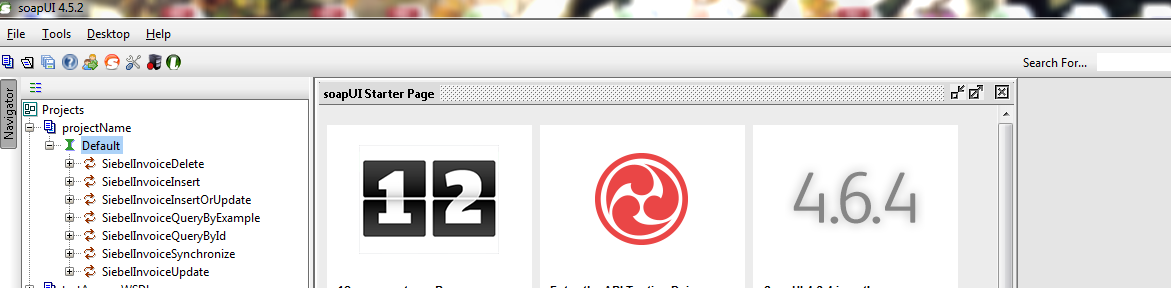
In this post I am going to show how to test WSDL or Webservice using SoapUI . SoapUI is a open source cross platform functional testing solution. It is really easy to use for create and execute automated functional, regression, compliance, and load tests. Open SoapUI tool then go to File and Create new soapUI project as  shown below

1)


2) Now give name of your project and select WSDL as shown below
3) Here on the left side you can see the methods of your WSDL that you can invoke
4) Now click on + sign on front of any method and then double click on Request, here your schema will load according to your WSDL method, just give values and hit run icon top of middle screen and then you will saw your result at extreme right side

Monday, February 24, 2014

Oracle Application Adapter error on activating in Weblogic Console resolved

Last couple of days i was facing the following issue when i try to update Apps Adapter in Oracle Weblogic consoleAn error occurred during activation of changes, please see the log for details.
[1] The ra.xml <connection-interface> class 'oracle.tip.adapter.apps.IAppsConnection' was not found in the resource adapter archive/application. 
[2] The ra.xml <connection-impl-class> class 'oracle.tip.adapter.apps.AppsConnection' was not found in the resource adapter archive/application. 
[3] The ra.xml <managedconnectionfactory-class> class 'oracle.tip.adapter.apps.AppsManagedConnectionFactory' was not found in the resource adapter archive/application. 
[4] The ra.xml <connectionfactory-impl-class> class 'oracle.tip.adapter.apps.AppsConnectionFactory' was not found in the resource adapter archive/application.


I was doing following guide to develop a service using Oracle Application Adapter Using Business Events

http://docs.oracle.com/cd/E12839_01/integration.1111/e10537/T430238T430579.htm

but no instance was getting created in Enterprise manager console. then i checked my Apps Adapter in Weblogic console and that was not in OK state. I had configured cluster environment and there were two SOA servers. I had to remove the target from 'cluster' and target it only to WLS_SOA1 server and then i updated and saved it and it started working fine without giving the above error.

Then again i created an Invoice (I was calling invoice Event) and instance created successfully in Enterprise manager console.

Tuesday, February 11, 2014

Forcefully close application in Linux command, Kill process in Linux

In this post i will show you how to forcefully close any application in Linux. I was using JDeveloper and unfortunately it got hang I tried to close it but i was unable to do it. I was looking some functionality like task manager in windows and found some commands to do this task. 
Following are some steps to do it.

1) Type "top" command in terminal and hit enter, you will see the running processes 
2) Find the PID of that application 
3) Then use "sudo killall [PID of that application]"  and hit enter.
Now your application has closed successfully.

Monday, February 10, 2014

Oracle SOA Suite installation required software & tools

To install Oracle SOA server, we need to have and installed following software. Download these software from OTN and then install for Oracle SOA suite environment.
1) Oracle Database 11g or SQL server
2) Repository Creation Utility (to create schema's )
3) WebLogic Server 11g
4) SOA Suite 11g
5) JDeveloper 11g
     JDeveloper extensions for SOA and BPM

You can also install oracle Service bus as per requirements.

Monday, January 27, 2014

Bridged Adapter problem, Host-only adapter problem Linux solved

From couple of weeks i was facing problem while setting my network setting in Virtual box. I explored lot of resources but unable to solve that problem. At last i figure out the issue and solve this problem and now i am sharing here and it could saves much time of others whom are facing the same issue.

 When i tried to choose bridge adapter or host-only adapter then i was facing the "no bridge adapter is selected"  or "no host-only adapter is selected" respectively. here are the snapshot to clear the problem.


I was using window 7 as a host and Virtual box which have Linux based environment for guest system. I wanted to communicate both of these machines but could not. Now what was the issue that i was facing :) little strange.

Open your network and sharing center in host machine i.e Window 7 in my case you will see disabled your network for virtual box. Please see the following snapshot for more clear idea.
oh the host-only network was disabled here and similarly others except my host machine network. Just right click on it and enable it. Now go to your virtual box and got to settings again and choose network setting and this time when you will choose host-only network there will be no issue. have a look at the following snapshot
Cheers! Now have a look at the IP of guest machine as well.