Tuesday, March 25, 2014

How to test WSDL/Webservice using SoapUI. What is Soap-UI

In this post I am going to show how to test WSDL or Webservice using SoapUI . SoapUI is a open source cross platform functional testing solution. It is really easy to use for create and execute automated functional, regression, compliance, and load tests. Open SoapUI tool then go to File and Create new soapUI project as  shown below

1)


2) Now give name of your project and select WSDL as shown below
3) Here on the left side you can see the methods of your WSDL that you can invoke
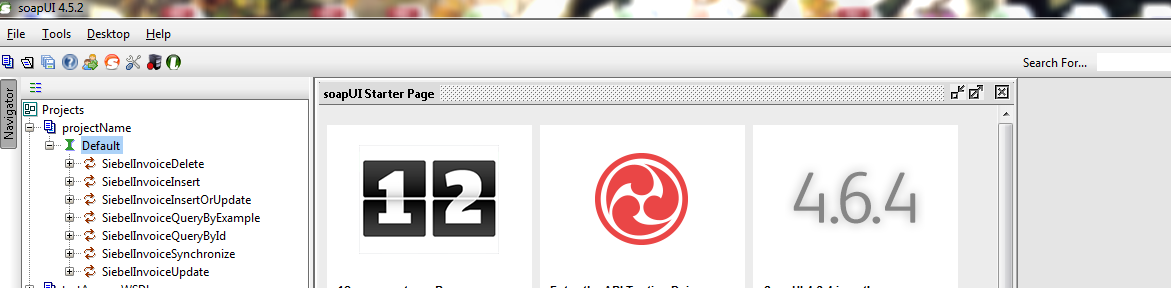
4) Now click on + sign on front of any method and then double click on Request, here your schema will load according to your WSDL method, just give values and hit run icon top of middle screen and then you will saw your result at extreme right side

Monday, February 24, 2014

Oracle Application Adapter error on activating in Weblogic Console resolved

Last couple of days i was facing the following issue when i try to update Apps Adapter in Oracle Weblogic consoleAn error occurred during activation of changes, please see the log for details.
[1] The ra.xml <connection-interface> class 'oracle.tip.adapter.apps.IAppsConnection' was not found in the resource adapter archive/application. 
[2] The ra.xml <connection-impl-class> class 'oracle.tip.adapter.apps.AppsConnection' was not found in the resource adapter archive/application. 
[3] The ra.xml <managedconnectionfactory-class> class 'oracle.tip.adapter.apps.AppsManagedConnectionFactory' was not found in the resource adapter archive/application. 
[4] The ra.xml <connectionfactory-impl-class> class 'oracle.tip.adapter.apps.AppsConnectionFactory' was not found in the resource adapter archive/application.


I was doing following guide to develop a service using Oracle Application Adapter Using Business Events

http://docs.oracle.com/cd/E12839_01/integration.1111/e10537/T430238T430579.htm

but no instance was getting created in Enterprise manager console. then i checked my Apps Adapter in Weblogic console and that was not in OK state. I had configured cluster environment and there were two SOA servers. I had to remove the target from 'cluster' and target it only to WLS_SOA1 server and then i updated and saved it and it started working fine without giving the above error.

Then again i created an Invoice (I was calling invoice Event) and instance created successfully in Enterprise manager console.

Tuesday, February 11, 2014

Forcefully close application in Linux command, Kill process in Linux

In this post i will show you how to forcefully close any application in Linux. I was using JDeveloper and unfortunately it got hang I tried to close it but i was unable to do it. I was looking some functionality like task manager in windows and found some commands to do this task. 
Following are some steps to do it.

1) Type "top" command in terminal and hit enter, you will see the running processes 
2) Find the PID of that application 
3) Then use "sudo killall [PID of that application]"  and hit enter.
Now your application has closed successfully.

Monday, February 10, 2014

Oracle SOA Suite installation required software & tools

To install Oracle SOA server, we need to have and installed following software. Download these software from OTN and then install for Oracle SOA suite environment.
1) Oracle Database 11g or SQL server
2) Repository Creation Utility (to create schema's )
3) WebLogic Server 11g
4) SOA Suite 11g
5) JDeveloper 11g
     JDeveloper extensions for SOA and BPM

You can also install oracle Service bus as per requirements.

Monday, January 27, 2014

Bridged Adapter problem, Host-only adapter problem Linux solved

From couple of weeks i was facing problem while setting my network setting in Virtual box. I explored lot of resources but unable to solve that problem. At last i figure out the issue and solve this problem and now i am sharing here and it could saves much time of others whom are facing the same issue.

 When i tried to choose bridge adapter or host-only adapter then i was facing the "no bridge adapter is selected"  or "no host-only adapter is selected" respectively. here are the snapshot to clear the problem.


I was using window 7 as a host and Virtual box which have Linux based environment for guest system. I wanted to communicate both of these machines but could not. Now what was the issue that i was facing :) little strange.

Open your network and sharing center in host machine i.e Window 7 in my case you will see disabled your network for virtual box. Please see the following snapshot for more clear idea.
oh the host-only network was disabled here and similarly others except my host machine network. Just right click on it and enable it. Now go to your virtual box and got to settings again and choose network setting and this time when you will choose host-only network there will be no issue. have a look at the following snapshot
Cheers! Now have a look at the IP of guest machine as well. 

Thursday, October 24, 2013

Mediator Vs Oracle Service Bus (OSB) in Oracle SOA Suite


In this post i am going to clear the basic difference between Mediator and Oracle Service bus. There is always some confusion between these two for new comers. Both of these components can be used for mediation purpose.

 Both mediator and Oracle Service bus can perform Interface and data mapping, filtering and routing etc but the scope of both these components are different. For Intra-composite mediation


i.e connection of components within a give composite we use Mediator Component while for Inter-composite mediation we use Oracle service bus i.e to connect different composites. While doing this OSB can also perform other basic tasks like , Protocol translation service pooling etc.

 To check out the usage of Mediator you can check this post
Mediator in Oracle SOA Suite

Monday, October 7, 2013

IO Error: Connection reset by peer: socket write error, Connection Closed SQL Developer

From couple of days i was facing IO Error: Connection reset by peer: socket write error, Connection Closed  in my SQL Developer. I connected with Remote server DB. After wasting much of time i got the solution, Now i am sharing it, if it could save time of who is facing this issue. I hope it would resolve the issue. 

The problem was due to Proxy, I was using Proxy for internet access but i did not used this proxy in SQL Developer. You should give proxy and must restart  your SQL Developer if you are using Proxy. 

To set Proxy go to Tools->Preferences->Web Browser and Proxy and set your Proxy there. In host name give your Proxy, in Port give port might be 8080 and in exception give any remote IP on which you facing this issue, Now restart your SQL Developer and try again, Problem will be no more.
Are you still getting problem? then try this solution too. 
SQLDeveloper is not connecting to remote database