Monday, February 16, 2015

Unlock user command for Oracle Database

Sometime a user gets locked and can not log in to database. To unlock it we need to run following command.

SQL> alter user username identified by Password account unlock;
User altered.
SQL>

Sunday, November 30, 2014

Oracle SOA file adapter example part 2

Continuing from previous part Oracle SOA file adapter examples using mediator, will will now configure File Adapter to write file.

1)  Drag and drop a file adapter in External references lane. Name it as "WriteFileAdapter" click next and then again next on operation window select Write File. Click next again and on file configuration window give directory path where you want to write your file like i did and also give file naming convention.

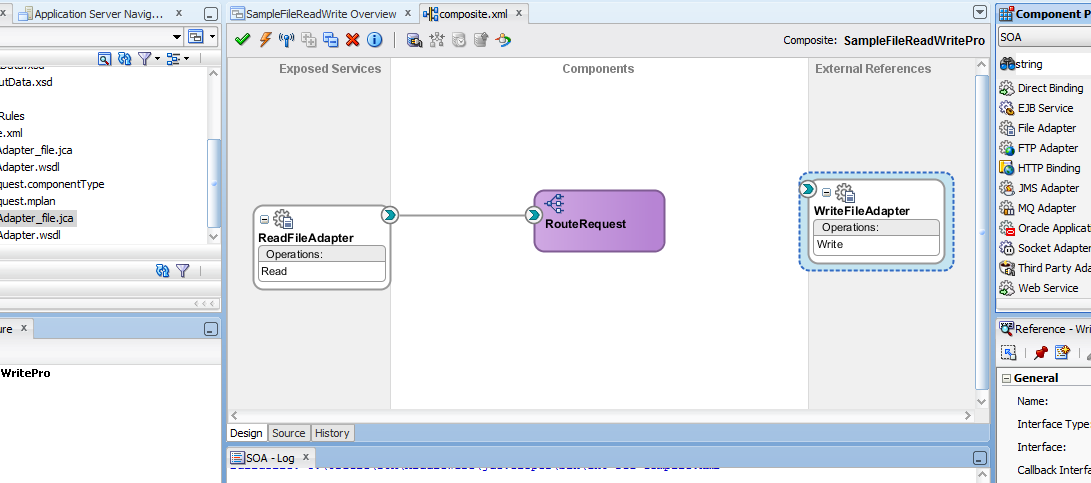
2) Click next to move on Messages window. click browse for schema file icon and select Writefile from OutputData.xsd. click next and finish the file creation wizard.your composite will now look like as shown below.
3) Now double click on your Mediator component "RouteRequest" It will open .mplan file, click on green + icon and select static routing rule. A popup will come then click on service as we are going to call a service.
4) From preferences select write under WriteFileAdapter. Now we will create a mapping file to map input and output files. Click on transform icon and create a new mapping file as shown below.
 6) Now map firstName with fName and lastName with LName as shown below

7) Now deploy your project on SOA server by directly using JDeveloper or create an SAR file and deploy manually. I suppose you have an idea how to deploy composite on server.
Copy the below lines and create new xml file, then put this file to your file reading directory wait at least some seconds max 1 minute. Your file will get delete from read file directory and will be written in your output file directory, Please check to verify. Lets see instance on enterprise manager.
XML file to use

<?xml version="1.0" encoding="UTF-8" ?>
<!--  $Header: sampleinput.xml 18-may-2007.04:44:38 mahnaray Exp $ -->
<ReadFile xmlns="http://TargetNamespace.com/readFile">
   <ReadFiles>
      <FirstName>Muhammad</FirstName>
 <LastName>Nasir</LastName>
   </ReadFiles>
</ReadFile>


You can expand flow trace to check process execution. Now you can check your write file directory as shown below.
Now you have learned how to configure SOA file adapter for file read and file write. You have learned how to configure and use Oracle Mediator and how to create transformation file. Please don't hesitate to comment if you find any problem.

Oracle SOA File read and Write example using Mediator and File Adapter

The main aim of this post is to show how we can use Mediator in SOA suite and how to configure file read and write adapters. This case could be useful in many cases. This is just a sample example and in real world you can design more complex scenarios using Mediator component. But this post will give you good information how to work with Mediator.

In this post we are going to read an xml file using read operation of file adapter and then we will write this to a file by using another file adapter component.

1) Create a new SOA application using JDeveloper and give name as "SampleFileReadWrite" and click next and name your project as "SampleFileReadWritePro" make sure SOA is select click next and then finish with Empty Composite Template


2) Now we are going to create two XSD files for our File Adapter. This will show how to create an XSD file in SOA. It is schema file that defines input and output of different services. In you project right click on xsd folder. Give name as "InputData" and click OK.

3) Click on the source view of your newly created file, Copy the below XML and past(override) into your InputData file.

<?xml version="1.0" encoding="UTF-8" ?>

<xsd:schema xmlns:xsd="http://www.w3.org/2001/XMLSchema"
            xmlns:nxsd="http://xmlns.oracle.com/pcbpel/nxsd"
            xmlns:tns="http://TargetNamespace.com/readFile"
            targetNamespace="http://TargetNamespace.com/readFile"
            elementFormDefault="qualified"
            attributeFormDefault="unqualified">
  <xsd:element name="ReadFile">
    <xsd:complexType>
      <xsd:sequence>
        <xsd:element name="ReadFiles" minOccurs="1" maxOccurs="unbounded">
          <xsd:complexType>
            <xsd:sequence>
              <xsd:element name="FirstName" type="xsd:string"/>
             <xsd:element name="LastName" type="xsd:string"/>
            </xsd:sequence>
          </xsd:complexType>
        </xsd:element>
      </xsd:sequence>
    </xsd:complexType>
  </xsd:element>

</xsd:schema>

4) Similarly create a another XSD file named as "OutputData" and copy below data in it.

<?xml version="1.0" encoding="UTF-8" ?>

<xsd:schema xmlns:xsd="http://www.w3.org/2001/XMLSchema"
            xmlns:nxsd="http://xmlns.oracle.com/pcbpel/nxsd"
            xmlns:tns="http://TargetNamespace.com/readFile"
            targetNamespace="http://TargetNamespace.com/readFile"
            elementFormDefault="qualified"
            attributeFormDefault="unqualified">
  <xsd:element name="Writefile">
    <xsd:complexType>
      <xsd:sequence>
        <xsd:element name="WriteFiles" minOccurs="1" maxOccurs="unbounded">
          <xsd:complexType>
            <xsd:sequence>
              <xsd:element name="FName" type="xsd:string"/>
             <xsd:element name="LName" type="xsd:string"/>
            </xsd:sequence>
          </xsd:complexType>
        </xsd:element>
      </xsd:sequence>
    </xsd:complexType>
  </xsd:element>

</xsd:schema>

5) Now click on composite.xml file to open it if its not open already. Drag and Drop a Mediator in Components pallet of composite and give name as "RouteRequest" and select "Define Interface later " as template if not selected already.

6) Now lets configure an inbound File Adapter for file reading. Drag and Drop a File adapter Component in Exposed Services swim-lane. Give name as "ReadFileAdapter"  Click Next then again next and from Operation window select "Read File" as operation type and again click next. On file directories window, give some physical path where your server reside as shown below in my case.
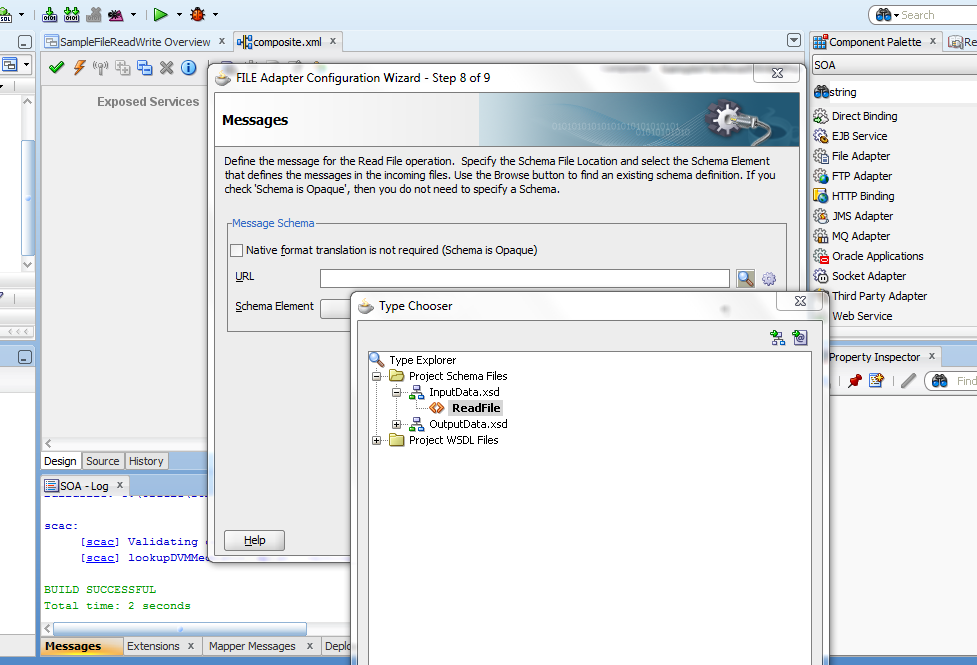
7) Click next to move on File Filtering window. Enter *.xml in Include files with name pattern. click next and let the polling frequency as it is i.e 1.  Click next to move on Messages Window. At the end of URL field click on browse for scheme file icon. Expand project schema file and select readfile under InputData.xsd as shown below
8) Click next and finish the file adapter wizard. Now drag a wire from ReadFileAdapter to RouteRequest mediator. Your composite will look like this now 
Now in next part of this post I will configure File Adapter to write in a file and then will will deploy this application on SOA server and test it.
Click to move on part 2 of this post
Tuesday, October 28, 2014

Error(24,68): SCAC-50012 Oracle SOA BPEL Error in JDeveloper while building application

I was following one of document/tutorial to implement email notification service in BPEL. But after completing it when I tried to build it, It gave Error(24,68): SCAC-50012. It was so generic error that I could not find exact detailed error. So I did again every step that I did to build application and rebuilt application of completion of each step.

Problem came when I created a BPEL process and I left its Input and output variable as it is. I rebuilt the application and It was fine at that point, then according to tutorial I need to past some XSD elements structure to my newly created XSD file. After doing that when I compiled it gave the above error. It could be because I did not mention Input and output parameter in wizard but added new elements to XSD and It could be some data types related error So I solved it first by designing an XSD and then I created BPEL process and gave Input and output parameter. Just sharing my findings and issue resolution. Hope it might help others too.    

Wednesday, September 17, 2014

Oracle OSB tutorial port issue, could not connect over HTTP to server

I was following Oracle OSB tutorial and got the following error

Tried all: '1' addresses, but could not connect over HTTP to server: 'localhost', port: '7021'

I thought that It could be a problem for new person on OSB so I am going to tell how you can resolve this issue. Simply first go to your WSDLs file after creating a new session on OSB and click WSDL file and click on EDIT button. Then scroll down the WSDL file and you will see the end point URI change it to according to your admin server as I did below

After doing in all your WSDLs, go to your business services and click on any business service which you are using. Go to Configuration Details tab and click Edit icon in front of Transport configuration.  and Update your End point URI port according to your WSDL file port as you did above. then click next and finish the wizard and hit save, Activate your session and test again and this time it will be successful.

Sunday, August 17, 2014

Internet of things (IoT), Oracle Internet of things

The inter connection of uniquely identifiable embedded computer like devices within an existing internet infrastructure is refers as Internet of things (IoT).  There is plenty of research and development going on in this field. Business men smell new opportunities of business in this area. Because of ubiquity nature of these devices, the number of devices will increase dramatically in near future.

The more and more of these devices are coming into market and consuming a huge amount of IP addresses. But due to the shortage of IPv4 IP addresses the need of IPv6 has increased intensively. So any research and development of IPv6 would be having a great impact on IoT. There are plenty of new IoT applications coming day by day. The importance of IoT devices and components data has increased.  So now some companies like Oracle providing framework to get this huge amount of data and process it to get valuable information of it.
Oracle provides an infrastructure to integrate and get these devices data securely and easily. Oracle IoT platform provides analytics capabilities and security of data, devices and users. Oracle SOA and BPM suite help integration of IoT with different enterprise application including cloud. For security Oracle IDM can be used and for mobility we can use Oracle mobile platform.

The internet of things (IoT) components and devices generate huge amount of useful data that can be collect and use to get useful information. Well to collect and use this data to gain valuable information is still going on and many developments have already done in this field. The difficulty to get and use this data is because of security, management of data and ever increasing of IoT components. 

Sunday, August 3, 2014

Oracle SOA Suite Mediator component

Oracle mediator provides mediation capabilities like transformation, selective routing and validation. It also provides message exchange patterns like synchronous, asynchronous, and event punishing or subscription. It provide a light weight framework for mediation in intra-composite components such as human workflow, business process etc.

Mediator can transform data from one format to another i.e we can give text file data and then after transformation we can send it to database. You can also use mediator component to consume a business event and for receiving service invocation. It helps integration between event and services. You can define rules based on message payload or header in mediator. You can select any attribute to make a routing rule. You can also set execution type of router either parallel or in sequence.